
Create Upload Target
최신 업데이트:2025-12-31 10:43:09
With the data upload feature, you can stream logs to third-party target locations to enable log storage, analysis, and enhanced data control.
The currently supported target types include Custom HTTPS, S3-Compatible, FTP/SFTP, Splunk, Syslog, Kafka, Aliyun SLS, and Rsync.
Target Type Feature Description
When selecting the target type for log delivery, you can configure exclusive features supported by each different target type.
All target types support the JSON log file format. However, Aliyun SLS does not support structured log files. If you need to view log samples with data (in both JSON and structured formats), please refer to the log format documentation.
Before selecting a log upload target type, you may refer to the table below to understand the functional support of each target type:
| Target Type | JSON Log | Structured Log Line | Custom Header | Custom Filepath and Filename | Dynamic Parameters |
|---|---|---|---|---|---|
| Custom HTTPS | ✓ | ✓ | ✓ | ✗ | ✓ |
| S3-Compatible | ✓ | ✓ | ✗ | ✓ | ✓ |
| FTP/SFTP | ✓ | ✓ | ✗ | ✓ | ✗ |
| Splunk | ✓ | ✓ | ✗ | ✗ | ✗ |
| Syslog | ✓ | ✓ | ✗ | ✗ | ✗ |
| Kafka | ✓ | ✓ | ✗ | ✗ | ✗ |
| Aliyun SLS | ✓ | ✗ | ✗ | ✗ | ✗ |
| Rsync | ✓ | ✓ | ✗ | ✓ | ✓ |
Note: Issues with Third-party Targets
- When streaming logs to a third-party target, temporary failures may occur due to latency, connection, or network link issues. To prevent data loss during upload failures, the system performs repetitive verification and retries log uploads continuously within
2 hoursat specific time intervals for failed deliveries. The retry time slice interval will be dynamically adjusted based on the number of retries, package size, and other factors.- Supported features vary based on the type of target. Please confirm your configuration requirements before setting up.
Procedure
- Enter the Log Service Platform.
- Click Upload Target Management on the navigation bar.
- On the Upload Target Management page, click the Create Upload Target button in the upper right corner.

Create Upload Target
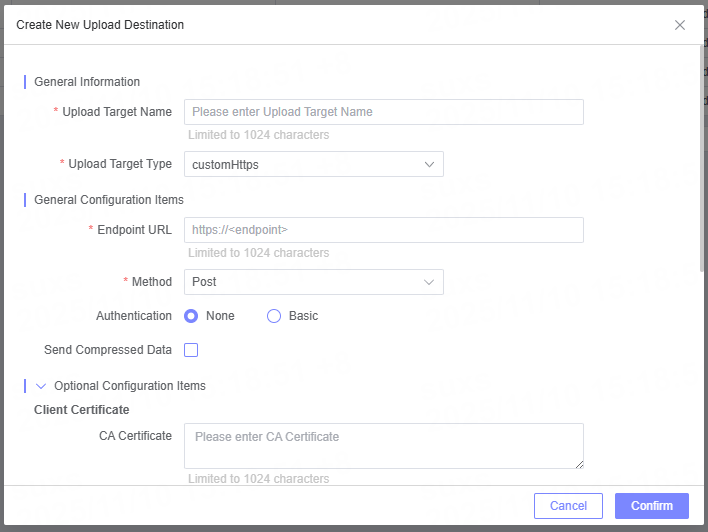
- Select the Target Type used for sending and storing data.
- Enter detailed information of the selected Target Type (such as Target Name, Endpoint URL, etc.). The required fields vary based on the different Target Types.
- For detailed configuration of Custom HTTPS, please refer to the relevant documentation.
- For detailed configuration of S3-Compatible, please refer to the relevant documentation.
- For detailed configuration of FTP/SFTP, please refer to the relevant documentation.
- For detailed configuration of Splunk, please refer to the relevant documentation.
- For detailed configuration of Syslog, please refer to the relevant documentation.
- For detailed configuration of Kafka, please refer to the relevant documentation.
- For detailed configuration of Aliyun SLS, please refer to the relevant documentation.
- For detailed configuration of Rsync, please refer to the relevant documentation.