
Rsync
Last update:2025-11-13 18:11:17
CLS supports sending log files to storage destinations compatible with the Rsync protocol.
Preparations
- Set up the server and install Rsync.
- Create the Rsync configuration file and the corresponding authentication file, and configure the perimeter firewall rules.
- Please refer to the official documentation to ensure the server can provide external services and receive incoming data.
Procedure
-
Select Rsync in Upload Target Type.
-
Enter a target description in Upload Target Name (up to 1024 characters) for identification.

-
Fill in the relevant Rsync configuration parameters according to actual requirements.
General Configuration Items
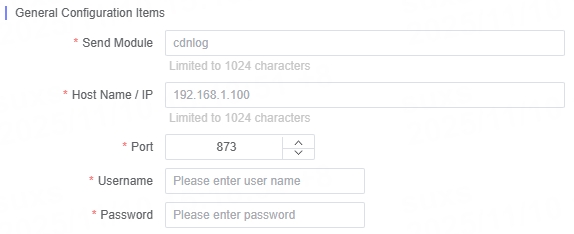
| Name | Description |
|---|---|
| Sending Module | Enter the corresponding Rsync module name for the data that needs to be synchronized. |
| Hostname/IP | Enter the hostname or IP address of the target server. |
| Port Number | The default is 873; please update it as needed based on your actual configuration. |
| Username | Enter the account name for accessing the target host. |
| Password | Enter the login password for the account on the target host. |
File Path and File Name Configuration
Depending on the log type, you can specify the corresponding file path and file name when configuring the upload task.
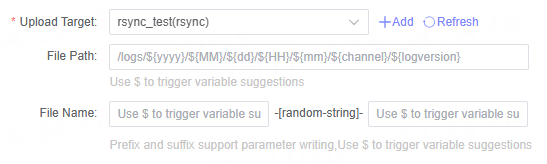
Note: Please ensure that all configuration information is entered correctly to guarantee that the log files can be successfully sent to the target Rsync server.
Related Articles
Is the content of this document helpful to you?
Yes
I have suggestion