
Custom HTTPS
Last update:2025-11-13 18:11:07
By following these steps, you can send logs to a custom HTTPS endpoint, enabling local receipt and processing of log data.
You can upload a client certificate to enable mTLS authentication for enhanced security and reduced transmission failures. Configuration of custom request headers is also supported.
CLS sends logs to the custom HTTPS address using POST requests. Please ensure that the receiving endpoint has the capability to handle POST request bodies.
Preparation
- Deploy a dedicated HTTPS endpoint that supports URL token authentication.
- Optional: Configure a username and password for your custom endpoint to enable basic authentication.
Note: Custom Endpoints and JSON Support
- If your custom HTTPS endpoint only supports JSON, please select JSON format in the Log Format tab.
Steps
-
Select Custom HTTPS for the Upload Target Type.
-
Enter an easily recognizable target description in Upload Target Name. The length must not exceed 1024 characters.
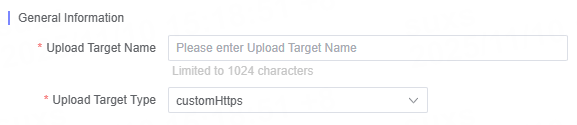
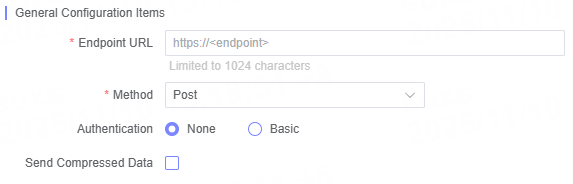
- Fill in each configuration parameter for Custom HTTPS as needed.
General Configuration Items
| Name | Description |
|---|---|
| Endpoint URL | Enter the target URL, such as https://<endpoint> Example: endpoint:oss-cn-bejing.aliyuncs.com |
| Method | Supports GET, POST, and PUT methods |
| Authentication | Authentication is disabled by default. If authentication is required, enter the Username and Password |
| Username | Enter the Username after enabling authentication |
| Password | Enter the password after enabling authentication |
| Send Compressed Data | Whether to send compressed data |
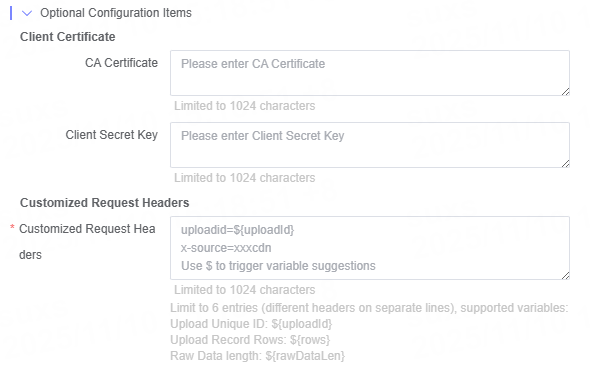
Optional Configuration Options
| Category | Name | Description |
|---|---|---|
| Client Certificate | CA Certificate | Enter certificate information |
| Client Key | Enter the client key | |
| Custom Header | Custom Header | If the target server requires special headers, you can customize their names and values. Up to 6 are supported (separate headers with line breaks). Supported variables: Reporting unique ID: ${uploadId}Reporting record count: ${rows}Data size: ${rawDataLen} |
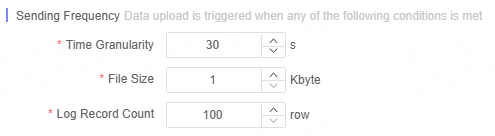
Define Sending Frequency
Note: Endpoint URL Requirements
- Please provide an endpoint URL that supports POST requests. If Basic Authentication is enabled, ensure your endpoint supports this authentication method.
- The URL must be in domain format and cannot be an IPv4 or IPv6 address.
Related Articles
Is the content of this document helpful to you?
Yes
I have suggestion