
S3-Compatible
Last update:2025-11-13 18:11:08
CLS supports sending log files to an S3-compatible storage as the destination.
Preparations
- Create a dedicated S3-compatible bucket in the target environment and record the Access Key ID and Client Secret Key.
- Ensure proper permissions (READ, WRITE, LIST) are granted to support access to the S3 destination.
- Depending on the specific target, you may need to configure and manage Server-Side Encryption (SSE) in the container settings.
- For detailed operations, please refer to the corresponding S3 official documentation.
Procedure
-
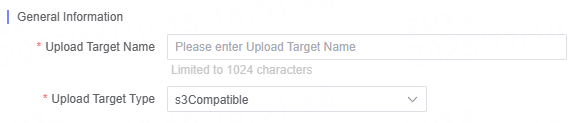
In Upload Target Type, select S3-Compatible.
-
In Upload Target Name, enter a descriptive and easily identifiable name for your target. The name cannot exceed 1,024 characters.
-
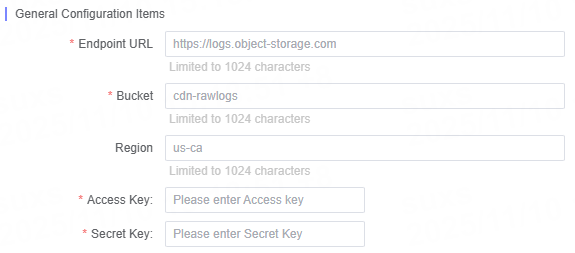
Enter each configuration parameter for S3-Compatible according to your requirements.
General Configuration Items
| Name | Description |
|---|---|
| Endpoint URL | Enter the URL address of the target storage service, such as https://logs.object-storage.com/. |
| Bucket | Enter the name of the bucket in your S3 account used for log storage. |
| Region | Enter the AWS region code where the bucket is located, for example, us-ca. |
| Access Key | Enter the access key assigned to this bucket. |
| Secret Key | Enter the secret key assigned to this bucket. |
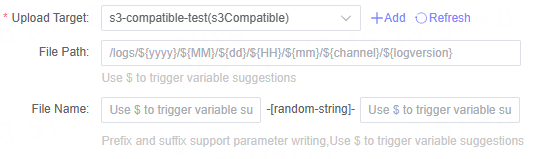
File Path and File Name Configuration
You can specify the corresponding file path and file name for different log types when configuring the upload task.
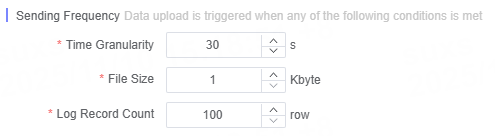
Define Log Delivery Frequency
You can customize the log delivery frequency to meet your business requirements.
Note:
For a higher level of security, it is recommended to enable Server Side Encryption (SSE) during configuration and keep your keys secure. For detailed configuration instructions, please refer to the official S3 documentation.