
FTP/SFTP
Last update:2025-11-13 18:11:10
CLS supports sending log files to FTP/SFTP storage as the destination.
Preparation
- Deploy a dedicated FTP/SFTP server. SFTP is recommended for higher security.
- Configure a username and password on the server to enable basic authentication.
- Firewall rules can be configured to allow access only from known IP addresses.
Procedure
-
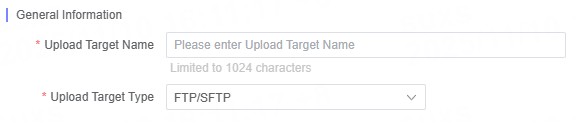
Select FTP/SFTP under Upload Destination Type.
-
Enter a descriptive and easily identifiable name for the upload destination (maximum 1024 characters) in Upload Destination Name.
-
Fill in the required S3-Compatible configuration parameters according to your requirements.
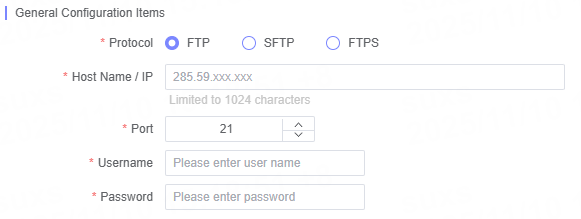
General Configuration Items
| Name | Description |
|---|---|
| Protocol Type | Supports three protocol types: FTP, SFTP, and FTPS. |
| Hostname/IP | Enter the hostname or IP address of the target server. |
| Port Number | The default port for FTP and FTPS is 21, and for SFTP is 22. |
| Username | Enter the access account for FTP, SFTP, or FTPS. |
| Password | Enter the password for the corresponding access account. |
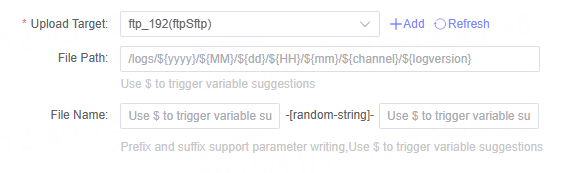
File Path and File Name Configuration
Depending on the type of log, you can specify the corresponding file path and file name when configuring the upload task.
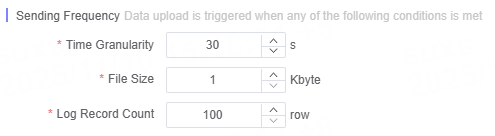
Define Delivery Frequency
You can customize the log delivery frequency to ensure that business requirements are met.
Related Articles
Is the content of this document helpful to you?
Yes
I have suggestion