
What Is Cloud Log Service Platform?
最終更新日:2026-01-27 11:02:20
Product Overview
Cloud Log Service (CLS) is a one-stop log management solution developed by CDNetworks, providing enterprises with unified management capabilities for the entire log lifecycle. CLS fully supports log collection, data processing, long-term storage, log delivery, and visual analysis, helping enterprises enhance the efficiency of R&D, operations, and security management during digital transformation, and enabling data-driven business insight and decision-making.
Product Advantages
-
End-to-End Closed-Loop Management
Provides an integrated closed-loop management process covering log collection, storage, analysis, and delivery for the entire log lifecycle, eliminating the need for cross-platform operations and ensuring unified and efficient workflows. -
Supports a Wide Variety of Upload Destinations
Upload supports a variety of target types, including Custom HTTPS, S3-Compatible, FTP/SFTP, Splunk, Syslog, Kafka, Alibaba Cloud SLS, Rsync, and more. -
Flexible Data Processing and Visualization
Provides self-service data processing and exploratory analysis capabilities, supporting a wide range of visual chart types to meet log analysis and presentation requirements across various business scenarios. -
High Security and Compliance Assurance
Features comprehensive end-to-end task monitoring and access control mechanisms to ensure secure data transmission and controlled access, fully meeting compliance audit requirements.
Application Scenarios
-
Business and Operations Log Management
Centrally collect and manage application logs distributed across multiple locations and environments, improving troubleshooting and operational automation efficiency. -
Security Audit and Compliance Management
Achieve centralized log collection, long-term storage, and efficient retrieval to meet compliance requirements for classified protection and security incident traceability. -
Business Monitoring and Intelligent Analytics
Quickly gain insights into business trends and identify potential risks through real-time data analysis and visual dashboards, empowering data-driven business decisions.
Core Workflow
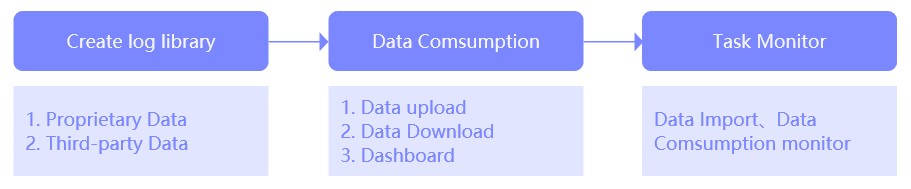
Feature Highlights
| Feature | Description |
|---|---|
| Log Library | As the starting point of the log service platform, users need to ingest data into the platform in order to use features such as data upload, download, and visual analysis. For details, refer to: Create Log Library. |
| Task Management | In the Task Management list, you can intuitively view all created tasks, and perform operations such as Edit, Pause, Monitor, and View Modification History. For details, refer to: Data Ingestion, Data Consumption. |
| Monitoring | Provides monitoring reports for all tasks (data ingestion and data consumption) to ensure task stability and visibility. For details, refer to: Monitoring. |
| Upload Target Management | Allows users to transmit log data to designated sites via multiple protocols.Supports a wide range of target types, including Custom HTTPS, S3-Compatible, FTP/SFTP, Splunk, Syslog, Kafka, Aliyun SLS, and Rsync. For details, refer to: Upload Target Management. |
| Dashboard | Supports self-service data preparation, exploratory data analysis, drag-and-drop chart creation, and flexible permission management, enabling users to quickly gain insights into data correlations, trends, and details through data analysis and visualization, thus assisting in business decision-making. For more details, see: Analyze Data Using Dashboard. |
Usage Restrictions
- The log storage duration and backup policy will affect storage costs and data availability. Please configure them reasonably based on your business requirements.
- The system may place restrictions on the number of tasks, query concurrency, and the amount of data for a single visualization analysis. It is recommended to optimize your usage strategy according to the official resource guidelines.