
Aliyun SLS
최신 업데이트:2025-11-13 18:11:16
CLS supports sending log files to an Aliyun SLS bucket.
Preparations
- Log in to the Alibaba Cloud Console, access SLS, create a Project, and select the appropriate region.
- Configure the network access point and confirm the Endpoint of the SLS Project. You can find this on the Project overview page. For example, the public Endpoint for East China 1 (Hangzhou) is
cn-hangzhou.log.aliyuncs.com. - Configure access credentials and grant the appropriate policy: you may choose AliyunLogFullAccess (full access) or a custom policy (such as write permission only for a specific LogStore).
- For detailed instructions, refer to the official Alibaba Cloud SLS documentation: Quick Start: Collect and Analyze Logs Using the Log Service SDK.
Steps
-
Select Aliyun SLS in the Upload Target Type.
-
Enter a description for the target in Upload Target Name. The description should not exceed 1024 characters for easy identification.
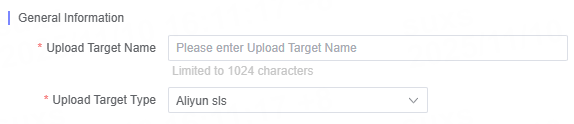
-
Fill in the relevant Aliyun SLS configuration parameters as required.
General Configuration Items
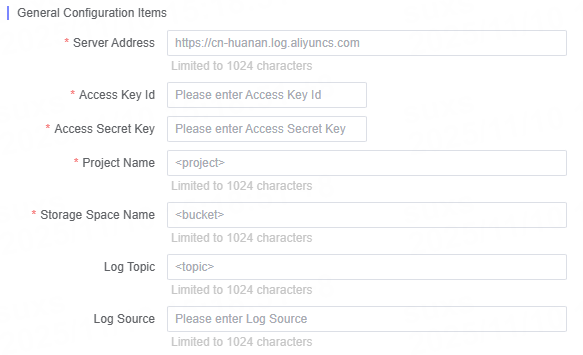
| Name | Description |
|---|---|
| Server Address | Enter the server address of the log service. |
| Access Key Id | Enter the Access Key Id used for authentication. |
| Access Secret Key | Enter the corresponding Access Secret Key. |
| Project Name | Enter the name of the log project already created under your Alibaba Cloud account. |
| Logstore Name | Enter the name of the log storage space already created under your Alibaba Cloud account. |
| Log Topic | Enter the name of the log topic. |
| Log Source | Enter information about the log delivery source. |
Send Frequency Settings
You can customize the log delivery frequency based on your business needs.
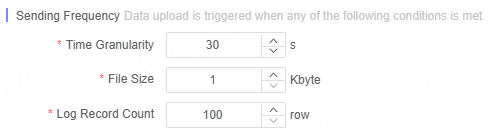
Note: Alibaba Cloud SLS only supports the JSON format.
- Alibaba Cloud SLS endpoint only supports JSON. Please select JSON format in the Log Format tab.
Related Articles
이 문서의 내용이 도움이 되었습니까?
예
아니오