
Splunk
최신 업데이트:2025-11-13 18:11:11
CLS supports delivering logs to Splunk. The Splunk platform can be used to search, monitor, and analyze your data.
You can choose to upload uncompressed log files or upload log files compressed using gzip.
With the Custom Header feature, you can select the content type from the log file and enter the header name and value accepted by the destination.
Preparation
To deliver logs to Splunk, please follow the steps below:
- Configure an HTTP Event Collector (HEC) instance that matches the type of Splunk software you are using, and create and enable a token.
- For detailed instructions, please refer to the Splunk Web documentation: Set up and use HTTP Event Collector
Steps
-
Select splunk as the Destination Type.
-
Enter a destination description that is easy to identify in Destination Name, with a maximum length of 1024 characters.

-
Fill in the required configuration parameters for Splunk as needed.
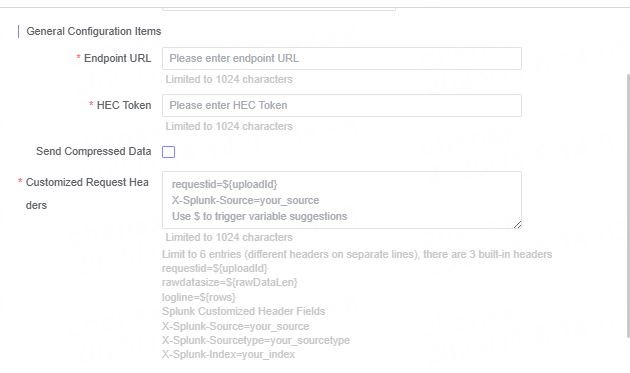
Name Description Endpoint URL Enter the target server’s URL address, for example https://your-splunk-endpoint.HEC Token Enter the token obtained from Splunk. Send Compressed Data Choose whether to send compressed data. Custom Request Header If the target server requires specific custom headers, please enter the header names and values. Up to 6 custom headers are supported; please enter each header on a new line.
The following 3 built-in headers are included:requestid=${uploadId}rawdatasize=${rawDataLen}logline=${rows}
Sample Splunk custom headers:X-Splunk-Source=your_sourceX-Splunk-Sourcetype=your_sourcetypeX-Splunk-Index=your_index -
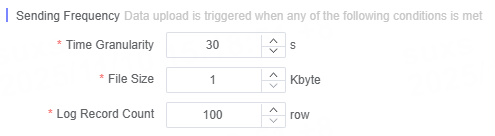
Define the log delivery frequency.
Note:
- Ensure that the Endpoint URL matches the actual HEC service address.
- Please keep the HEC Token secure to prevent leakage.
Related Articles
이 문서의 내용이 도움이 되었습니까?
예
아니오