
Get Started
Last update:2026-10-19 14:21:50
Media Acceleration Live Broadcast delivers live video through the CDNetworks content delivery network (CDN). This guide explains how to create live streaming domains, configure DNS, and test ingest and playback.
Plan your live streaming domains
Live streaming involves a source, a CDN, and viewers. The source provides a stream, CDNetworks receives or retrieves it, and viewers request it through a compatible player.
The following diagram shows how a stream enters CDNetworks and reaches viewers.
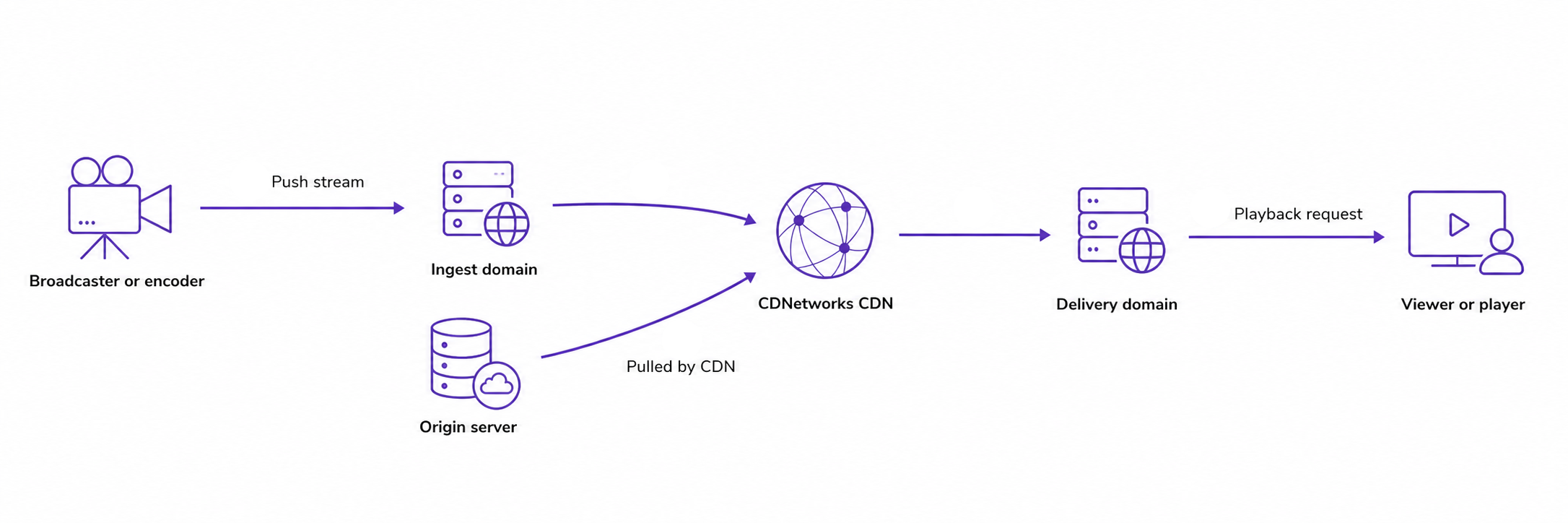
Choose the domains and stream ingest mode that match your workflow:
| Workflow | Domains to create | How it works |
|---|---|---|
| Origin Pull | A delivery domain | CDNetworks pulls the stream from your origin and delivers it to viewers. |
| Publisher Ingest | An ingest domain and an associated delivery domain | A broadcaster or encoder pushes the stream to the ingest domain. Viewers play it through the delivery domain. |
An ingest domain receives streams from broadcasters or encoders. A delivery domain provides playback URLs for viewers. For Publisher Ingest, create the ingest domain first so you can select it when creating the delivery domain.
Add a live streaming domain
- Go to Media Acceleration Live Broadcast > Configuration.
- Choose New Domain.
- Configure the basic information.
| Field | Required | Description |
|---|---|---|
| Contract Item | Yes | Select the contract item for the domain. |
| Custom Control Group | No | Select an existing control group, or leave this field empty. |
| Domain Role | Yes | Select Ingest or Delivery. |
- Configure the domain for the selected role:
- Ingest: Enter the domain name in Ingest Domain.
- Delivery: Select the Stream Ingest Mode and complete the corresponding settings below.
For Origin Pull:
| Field | Required | Description |
|---|---|---|
| Origin Protocol | Yes | Select the protocol used to retrieve the stream from your origin: RTMP, HTTP-FLV, HLS, or DASH. |
| Domain | Yes | Enter the delivery domain name. |
| Origin Address | Yes | Choose Bring Your Own Origin and enter the origin IP address or hostname, or choose Object Storage to use CDNetworks object storage. Separate multiple origin IP addresses with semicolons (;). |
Use Add for another domain row or Bulk Add (Same Origin, Multiple Domains) for domains that share an origin. Batch Import is also available.
For Publisher Ingest:
| Field | Description |
|---|---|
| Ingest Domain | Select the ingest domain for stream delivery. To associate one later, use Linked Domains in the domain list before testing playback. |
| Delivery Domain | Enter the delivery domain name. |
- Configure the remaining domain settings.
| Field | Description |
|---|---|
| Application Name | Enter the application path in the stream URL, such as live in rtmp://push.example.com/live/demo. Separate multiple names with semicolons (;). Leave this field empty to allow all application names. |
| Notes | Add internal notes for the domain. |
- In Acceleration Configuration, choose how to create the configuration:
- Custom Configuration: Start with the default configuration and adjust settings after creating the domain.
- Copy Configuration from Existing Domain: Select an existing domain to copy its configuration.
- Optional: In Associate Certificate, select an available certificate if the domain will use HTTPS. If no certificate is available, complete certificate setup before testing HTTPS playback.
- Review the settings and choose Submit.
The new domain appears in the domain list with an assigned CNAME target.
Configure DNS
Complete these steps for each ingest and delivery domain:
- Copy its assigned CNAME target from the domain list.
- At your DNS provider, add a CNAME record whose name is your ingest or delivery domain and whose target is the assigned CDNetworks CNAME.
- Use a DNS lookup tool to confirm that the record resolves to the assigned target. Allow time for DNS changes to take effect.
Use your own ingest and delivery domain names in stream URLs. The assigned CNAME target is for DNS configuration.
Example: Push a stream and play it back
This example uses Publisher Ingest with the following values:
| Item | Example |
|---|---|
| Ingest domain | push.example.com |
| Associated delivery domain | play.example.com |
| Application name | live |
| Stream name | demo |
Before testing, confirm that both domains resolve correctly, the delivery domain is associated with the ingest domain, and the application name and playback protocol are allowed. The HTTPS examples below also require a valid certificate for the delivery domain.
In OBS Studio or another compatible encoder, configure custom RTMP output:
- Server:
rtmp://push.example.com/live - Stream Key:
demo
Start streaming. The encoder publishes the stream as live/demo. While the encoder is sending data, open a compatible player and test a playback URL for an enabled protocol:
| Protocol | Example playback URL |
|---|---|
| RTMP | rtmp://play.example.com/live/demo |
| HTTP-FLV | https://play.example.com/live/demo.flv |
| HLS | https://play.example.com/live/demo/playlist.m3u8 |
Replace the example values with your own. If authentication is enabled, include the required authentication parameters in the ingest and playback URLs as configured for each domain.
If ingest or playback fails, see Live Streaming Troubleshooting.
Configure domain features
Review the settings that apply to your workflow before going live.
| Guide | Use it to |
|---|---|
| Origin Settings | Configure origin addresses, origin protocols, the origin Host header, and advanced origin routing. |
| Application Names and Delivery Protocols | Restrict application names and control playback protocols. |
| Access Control | Configure IP, Referer, and User-Agent access lists, token authentication, or remote authentication. |
| Cache Optimization | Configure cache rules and query string handling for HLS or DASH origin-pull delivery. |
| HTTP Protocol Settings | Manage HTTP headers and HTTP/2 connections. |
| Stream Status Callbacks | Configure notifications for ingest start and end events. |
| Client IP Forwarding | Pass client IP addresses to your origin. |
| Log Service | Review access log settings and choose log file intervals. |