
Set Origins
Last update:2026-05-09 14:15:18
You can configure either Basic Origin or Advanced Origin as needed:
- Basic Origin: Allow CDN to send origin request by setting the origin hostname/IP.
- Advanced Origin: This routes traffic to distinct origins based on the region/ISP, or employs a weighted round-robin to alternate among multiple origins.
How to Set Basic Origin
- Log in to the CDNetworks Console, and select the appropriate product.
- Navigate to the Configuration, locate the domain you wish to configure, and click
 .
. - You can configure the following settings based on your needs.
Origin Type
- Bring Your Own Origin: Allows you to set origin IP addresses or a hostname. It supports multiple IPs (up to 500 characters) or 1 hostname.
- Object Storage: If you are using CDNetworks’ Object Storage service, you can designate your Object Storage as the origin by selecting it. Upon selection, a drop-down box of hostnames will appear that point to different buckets in your object storage, that is, you can specify a specific bucket as origin by selecting the corresponding hostname in the drop-down box.
IPs/Hostname
You can enter either IP or hostname.
- If entering IPs, up to 64 IPs can be entered, separated by
;. - If entering hostname, only 1 hostname can be entered.
The origin hostname can also be configured in Origin URL Rewrite and Batch Modify Origin, and Origin URL Rewrite takes the highest effective priority. In other words, when the origin hostname is configured in multiple places, the value configured in Origin URL Rewrite takes effect.
Host Header
The Host header is a mandatory field in an HTTP request that specifies the hostname or domain of the server the client wishes to communicate with. It’s necessary because multiple domains can share the same IP address on a server, and the origin uses this value to determine what content to send. After configuration, when a client request carries the Host value, the origin will respond with content related to that hostname or domain.
For example, if the value is set to www.cdnetworks.net, an end-user request for www.testdomain.com could send www.cdnetworks.net in the Host header to the origin. Then the origin will respond with www.cdnetworks.net related content.
Hostheader can also be configured in Origin URL Rewrite, Batch Modify Origin and Host Header and Port, and Origin URL Rewrite takes the highest effective priority. If configured simultaneously, the configuration in Origin URL Rewrite takes effect.
Port
It allows you to override the destination port on your origin server to which CDN servers send requests.
For example, if the port value is set as 9000 for your domain cdnetworks.com, when receiving a request for cdnetworks.com, CDN servers connect to origin with port 9000(cdnetworks.com:9000).
If no port is configured, the original request’s port is followed for back-to-origin.
If an Advanced Origin is configured and you need to change the port back to the advanced origin, please contact CDNetworks technical support.
Port can also be configured in Batch Modify Origin and Host Header and Port. Please make sure you haven’t configured repeatedly and cause a conflict.
How to Set Advanced Origin
- Log in to the CDNetworks Console, and select the appropriate product.
- Navigate to the Configuration, locate the domain you wish to configure, and click .
- Find the Advanced Origin button, which is off by default, and click to enable it.
- Click Add to add advanced origin configuration rules.
Region and ISP
Indicates that users belonging to this region/ISP use this advanced origin rule when requesting back-to-origin.
When configuring Region/ISP, please ensure that at least one advanced origin rule includes a region of Global; otherwise, the configuration cannot be submitted.
While setting the rules, note that the granularity of available regions differs. Depending on the selected region, the available options differ. In some regions, such as Mainland China, you can select specific ISPs, while in other regions, you can only choose the applicable country.
Mode
There are two modes for Advanced Origin, but you can view only one non-editable mode because the console has already set the default mode for each product, and this configuration cannot be changed directly in the console. To modify advanced origin settings, please contact the CDNetworks technical support for assistance.
- Smart Routing: In this mode, when multiple origin servers are available, the CDN edge server uses an intelligent detection algorithm to choose the optimal origin server for traffic.
- Weighted Round-Robin: This mode assigns different weight values to each origin server. When requesting to origin, the CDN edge server will poll the origin servers proportionally based on their assigned weights, ensuring traffic is distributed according to the preset weight ratios.
Advanced Origin
-
Tier
This setting defines the priority order of origin servers, the lower the tier number, the higher the priority. For example, Tier 1 represents the primary origin, Tier 2 is the primary origin’s backup, and Tier 3 is the primary backup’s backup. The CDN will prioritize accessing Tier 1 origins first and, if they are unavailable, will proceed to Tier 2, and so forth. Multiple origin servers can share the same Tier, but each Origin IP/Hostname field contains only one IP or hostname. To add more origin servers, click Add to include additional origin IPs or hostnames. -
Weight
This setting assigns weight values to origin servers within the same Tier. The CDN edge server will distribute traffic among these origin servers according to their assigned weights, ensuring traffic is allocated proportionally. In Smart Routing, weight configuration is NOT applicable since the CDN edge server will always choose the best origin server based on the intelligent algorithm. However, if Primary Origin Round-Robin/Backup Origin Round-Robin is enabled in Origin Failover & Selection Strategy, the traffic will be routed based on weight, overriding the Smart Routing algorithm. -
Host Header
Hostheader allows you to specify different back-to-origin hosts for each origin hostname or IP address, ensuring that the CDN edge server includes the appropriateHostheader in its back-to-origin requests. This setting applies only to Weighted Round-Robin mode and is unavailable in Smart Routing mode.
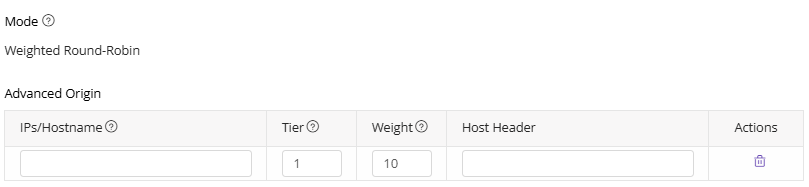
Origin Failover & Selection Strategy
- Enable Offline Mode: When Offline Mode is enabled, the CDN will strictly follow the advanced origin configurations for fetching content. If the advanced origins are unavailable, the system will enter Offline Mode, during which CDN edge servers will respond based on cached resources.
- Primary Origin Round-Robin: When Primary Origin Round-Robin is enabled, if multiple primary origins (those with the lowest Tier value) exist, the CDN edge servers will distribute traffic among these primary origins based on their assigned weights, even in Smart Routing mode. This method enforces the use of weights instead of the intelligent detection algorithm.
- Backup Origin Round-Robin: Similar to Primary Origin Round-Robin, when Backup Origin Round-Robin is enabled and multiple backup origins (those not with the lowest Tier value) exist, the CDN edge servers distribute traffic to these backup origins based on their assigned weights, bypassing the intelligent detection algorithm, even in Smart Routing mode.
After you have completed setting the configurations, please click OK and then select Next to submit your settings. To minimize any potential disruptions to your production environment, we strongly recommend conducting a Pre-deploy test in a staging environment. This crucial step ensures that your configurations are accurate before they go live. Once you have verified the accuracy of the settings, click Deploy Now to implement them in the live environment. The configurations typically become effective within 3-5 minutes. For comprehensive guidance on pre-deployment testing and to verify the effectiveness of your configurations, please consult the tutorial Deploy the Configurations to Staging Environment for Validation.
Best Practices
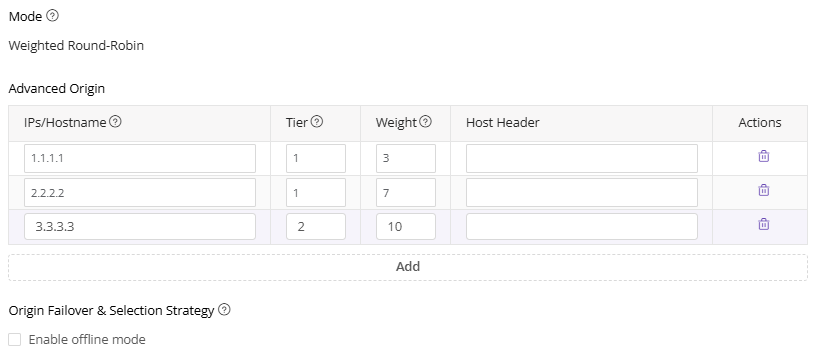
Example 1: Weighted Round-Robin
1.1.1.1 and 2.2.2.2 are primary origins, 3.3.3.3 is a secondary origin. Preferentially back to primary origins, 1.1.1.1 and 2.2.2.2 are polled at a ratio of 3:7. When primary origins are unavailable, then back to the secondary origin.
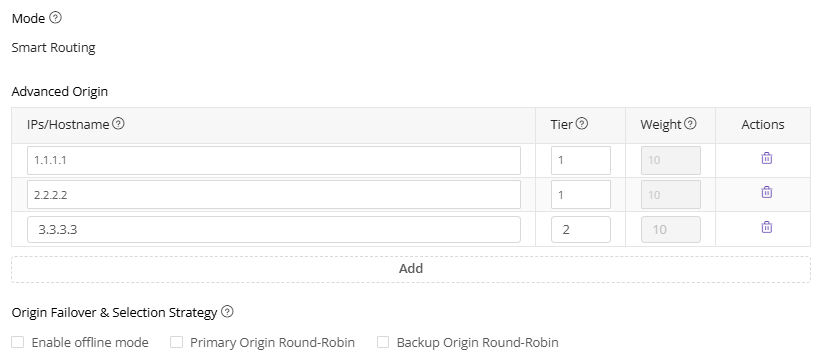
Example 2: Smart Routing
1.1.1.1 and 2.2.2.2 are primary origins, 3.3.3.3 is a secondary origin. Preferentially back to primary origins, 1.1.1.1 and 2.2.2.2 are chosen based on CDNetworks smart routing results (not by weight). When primary origins are unavailable, then back to the secondary origin.
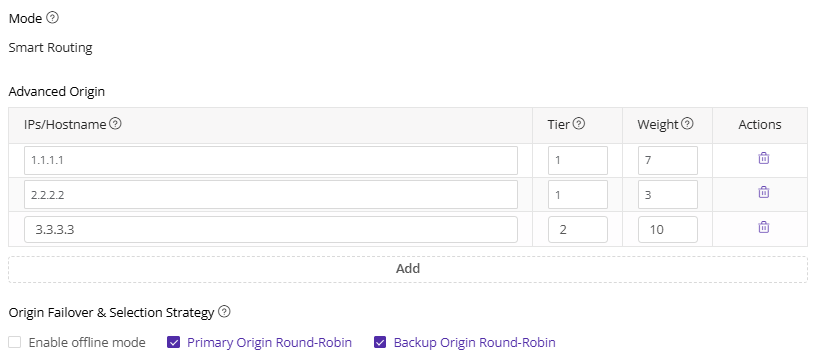
Example 3: Smart Routing + Primary/Backup Origin Round-Robin
1.1.1.1 and 2.2.2.2 are primary origins, 3.3.3.3 is a secondary origin. Preferentially back to primary origins, 1.1.1.1 and 2.2.2.2 are polled at a ratio of 7:3. When primary origins are unavailable, then back to the secondary origin. Here, smart routing results are only used to choose the optimal path among CDN servers.
Notes
-
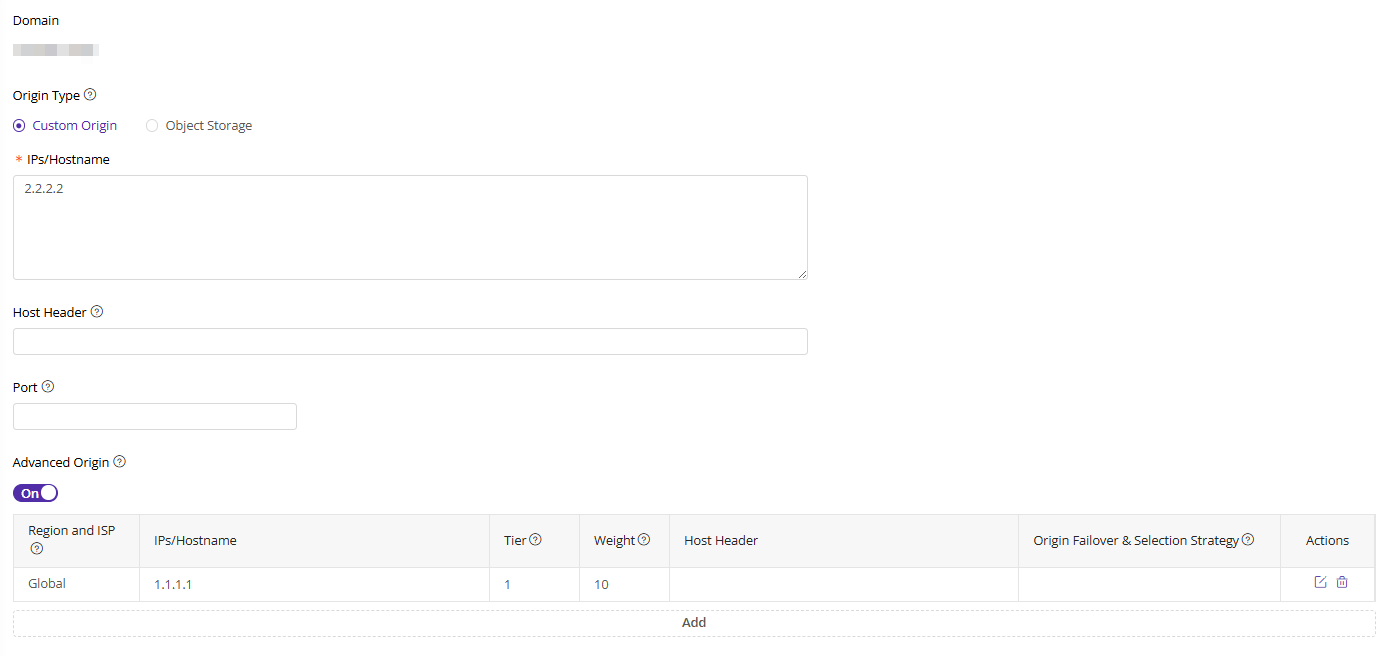
Advanced origin configuration takes precedence over basic origin configuration. For example, the effect of the following configuration is to preferentially back to
1.1.1.1, and if back-to-origin fails, then back to2.2.2.2.
-
When the CDN sends requests to the origin according to advanced origin settings, CDN will use the same port with the client’s request port by default. If you need to change the back-to-origin port for advanced origin, please contact CDNetworks technical support.
-
If there are overlapping regions in the configured rules, the smallest granularity region is prioritized. For example, the effect of the following configuration is that, when China Telecom users back-to-origin, preferentially back to
3.3.3.3, and if back-to-origin fails, then back to2.2.2.2, and finally back to1.1.1.1.
