
Use Webhook Callbacks for Alert Notifications
Last update:2026-03-18 17:01:51
This guide will help you understand how to receive alert notifications by configuring a Webhook callback, and provide a simple step-by-step guide to help you complete the configuration and testing successfully. Webhook callbacks send information to the URL you specify when an alert occurs, which is an ideal way to achieve automated monitoring and response.
Configuring Webhook Callbacks
Create an alert rule
To use the Webhook feature, you first need to create an alert rule:
- Enter Cloud Monitoring > Alert Service > Alert Rules.
- Click the Add Alert Rule button.
- Set the rule name and alert conditions.
- Select the “Webhook” option in the notification method.
Configuring the Webhook Callback URL
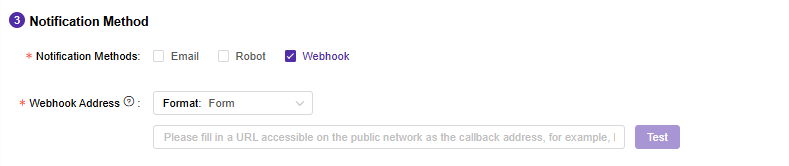
When creating an alert rule, you need to specify the target URL for the Webhook callback:
- Enter the URL address where you want to receive alert notifications. Make sure the URL is a publicly accessible address and the target server can handle POST requests.
- Save your changes.
Make sure that your Webhook receiver can correctly parse and respond to the POST request from the Cloud Monitoring system to avoid alert notification failure.
Testing Webhook Callbacks
Send test alert
To confirm that the configuration is correct, it is recommended to run a test:
- Click the Test button on the right side of the Webhook input box to simulate the triggering alert condition.
- Check whether your Webhook receiver has received the Cloud monitoring callback. The callback parameters are as follows:
POST request content may add new parameters, so your Webhook needs to be compatible with the new parameters.
Alert notification fields [Form]
| Parameter | Type | Description |
|---|---|---|
| loginName | string | Account to which the alert rule belongs |
| alertTime | string | Alert time |
| ruleName | string | Alert rule name |
| monitor | string | Alert content |
Alert dismissal notification fields [Form]
| Parameter | Type | Description |
|---|---|---|
| loginName | string | Console account associated with the alert dismissal rule |
| restoredAlertTime | string | Dismissal time. Example: 2025-01-05 11:05:00(GMT+8) |
| ruleName | string | Alert dismissal rule name |
Alert notification fields [JSON]
| Parameter | Type | Description |
|---|---|---|
| loginName | string | Console account to which the alert rule belongs |
| alertTime | string | Time of alert occurrence Example: 2025-01-05 11:05:00(GMT+8) |
| ruleName | string | Name of the alert rule |
| monitor | string | Alert monitoring items and their corresponding thresholds (if multiple items meet thresholds simultaneously, multiple callbacks will be triggered). Format: 1. For merged statistics: Monitoring item name (monitoring value), e.g., Bot attack request ratio (200.00%). 2. For individual statistics: Monitoring item name (Domain:monitoring value), e.g., Bot attack request ratio (sitxxxx.com:200.00%). For sudden increase/decrease monitoring items, prefix threshold with ↑ or ↓, e.g., Bot attack request ratio (sitxxxx.com:↑200.00%) indicates a spike. |
| alertLevel | string | Alert level: normal, serious, urgent |
Alert clear notification fields [JSON]
| Parameter | Type | Description |
|---|---|---|
| loginName | string | Console account to which the alert clearing rule belongs |
| restoredAlertTime | string | Alert clearing time Example: 2025-01-05 11:05:00(GMT+8) |
| ruleName | string | Alert clearing rule name |
If you do not receive the expected test alerts, check the network connection and receiver configuration to ensure that they are working properly.
Common Problems and Solutions
- If you do not receive any notifications, check the following points:
- Is the URL correct and accessible?
- Whether the receiving end handles the POST request correctly.
- The network connection is normal and there is no firewall blocking it.
Through the above steps, you should be able to successfully configure and run the Webhook callback alert system to achieve automated event notifications. Based on your needs, you can also expand and customize your monitoring and response policy to improve system response speed and efficiency.