
Bind Service Domains
Last update:2025-08-06 11:04:47
Binding a custom domain allows your end users to download objects from a specific Object Storage bucket using the domain you specify. If you do not need a custom service domain, you can skip this step. Object Storage provides an endpoint domain (supporting S3), which end users can use directly to download objects.
The main functions and benefits of binding a domain are as follows:
- Branding and Recognition: Users can access resources through a more concise and recognizable domain, enhancing their trust and the professionalism of the brand.
- Integration with CDN Acceleration: Binding a domain makes it easier to integrate with a CDN for global acceleration and resource caching.
- More Flexible Access Control: Using a custom domain for access offers greater flexibility and convenience.
Usage Scenarios for Domain Binding
Binding a domain is optional and depends on your actual use case. Below, you will find scenarios for accessing Object Storage. If you are using the CDN + Object Storage solution, you usually need to complete domain binding.
If customer require domain to bind with storage
- Use CDNW CDN
The customer wishes to leverage CDNetworks’ global acceleration network to significantly improve end-users’ download speed, reliability, and concurrency, while offloading pressure from the origin bucket.
 1. Bind CDNW CDN acceleration domain to bucket.
 2. In the CDN configuration, set the bucket as the origin.
- Use Third-Party CDN
The customer already uses or prefers another CDN service provider and wishes to accelerate access to Object Storage content through this third-party CDN.
  1. Bind third-party CDN domain to bucket.
  2. In third-party CDN configuration, set the bucket as the origin.
- Don’t use CDN
The customer does not require or is unsuitable for CDN acceleration, or wishes to use their own branded, memorable domain.
1. Bind customer’s own domain to the bucket.
2. Set up a CNAME record pointing to the bucket. Object Storage provides two types of domain names for CNAME configuration: the Endpoint domain (supports S3) and an assembled origin domain (CNAME Domain) provided by CDNetworks. You can choose either one for your CNAME setup.
For information on how to obtain relevant domain names, please refer to Obtain Domains.
If customer don’t require domain
Using Object Storage’s default Endpoint Domain meets the requirements.
1. User can download object by using the Endpoint domain of the specific bucket
2. Integrate the Endpoint domain into your API or web portal as required.
Binding a Domain in the Console
- Log in to the CDNetworks Console and select Object Storage Service.
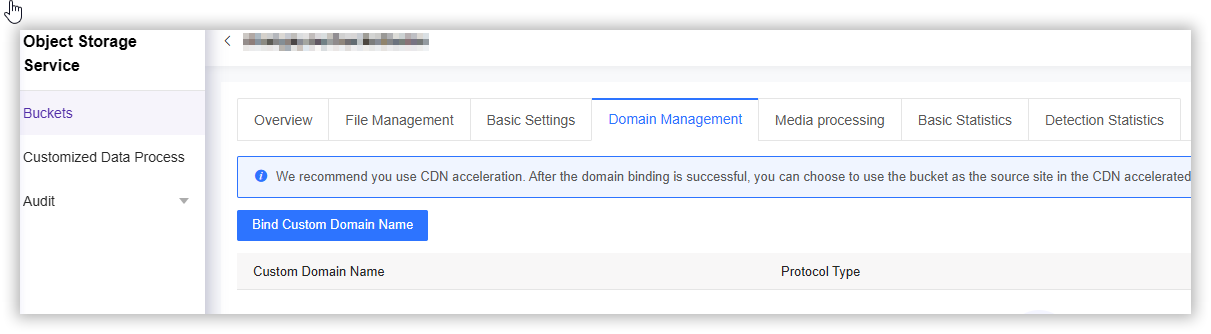
- Click the Name of the bucket you want to manage, or click Manage on the far right of the corresponding bucket.
- On the details page, click Domain Management in the upper section.
- Click the blue Bind Custom Domain Name button,choose the protocol type: HTTP or HTTPS,and enter your new domain in the field provided.
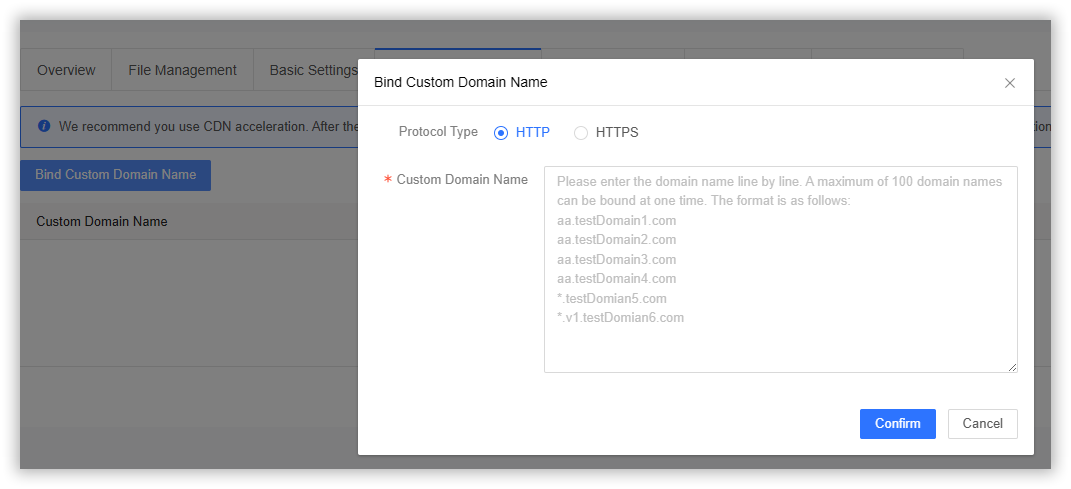
Protocol Type
Select the protocol type, with HTTP and HTTPS currently supported (defaults to HTTP).
Custom Domain Name
Enter the domains. Conventional domains and wildcard domains are supported. A maximum of 100 domain names can be bound at one time.