
Overview
최신 업데이트:2026-08-28 18:20:19
Introduction to Properties
A “property” is a collection of config items for the hostname(s) to be served by CDN Pro servers. You can specify one or more hostnames in a property. Each property includes a set of edge configurations that determine how CDN Pro servers handle requests to your hostnames, such as how to fetch content, caching policies, and how to respond to clients. By managing properties, you manage the configurations for your hostnames accelerated on CDN Pro. This article describes how to manage your properties.
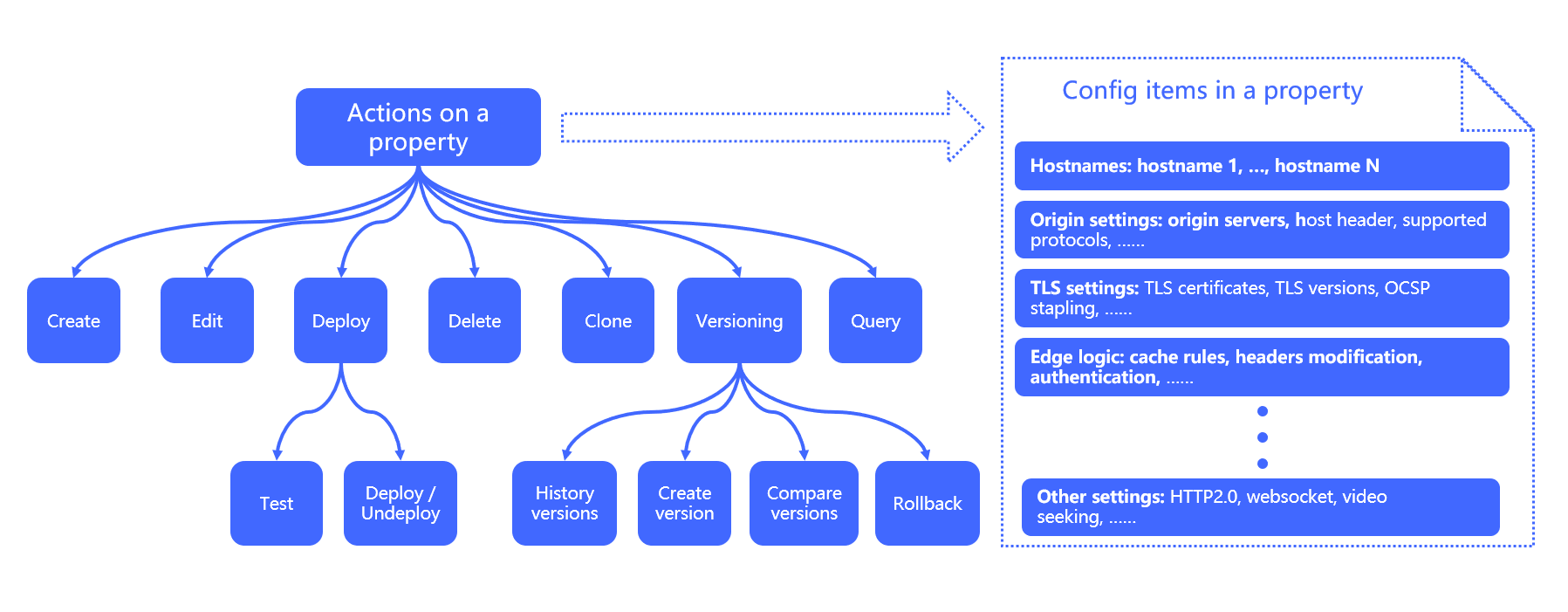
Manage Properties
You can create, view, edit, delete, clone and deploy properties. In particular, CDN Pro supports configuration versioning and multiple deployment environments.
-
Version control: Each property can have one or multiple versions. You can compare different versions and view change logs to track the configuration history of a property. This makes it easy to do version control.
-
Environments: CDN Pro provides a production environment and a staging environment for you to deploy your properties. You can deploy version A of a property to production and version B to staging. This means you can always test and debug your property in staging to ensure the configuration meets expectations before touching the production environment.
The Properties List Page
In CDN Pro console, click Edge Configuration > Properties to open the properties list page. On this page, you can:
- Filter and list properties. Enter a keyword to search for properties that have property ID, name, or description matching the keyword. Enter a hostname to search for properties that contain the hostname. Specify a target to list properties deployed to that target. Use Advanced Search to look up for properties, based on expressions. For more about advanced search, refer to List Properties.
- Take actions on an existing property.
- Create a property.
Actions on a Property
On the Actions column, you can do the following for an existing property:
- Deploy: Deploy a specific version of a property to production or staging.
- Edit: View and edit a property.
- Compare versions: Diff check any two versions of a property.
- Undeploy from staging: Undeploy a property from the staging environment.
- Undeploy from production: Undeploy a property from the production environment.
- Delete: Delete a property.
- Deployment history: View the deployment history of a property.
- Clone: Clone an existing property to create a new one.
- View report: View reports for all hostnames under a property.