
Set User Metadata
Last update:2025-08-11 11:34:37
File metadata refers to data that describes the attributes of files (objects) in object storage. Metadata can include both system-generated information and user-defined additions. It encompasses custom user data and HTTP standard attributes. This article describes how to manage metadata through the console.
How to Set HTTP Header
1. Log in to the CDNetworks Console and select Object Storage Service.
2. Click the Name of the bucket you want to manage, or click Manage on the far right of the corresponding bucket.
3. On the details page, click File Management in the upper section.
4. After selecting the target file, click the Set HTTP Header button under More to set it.
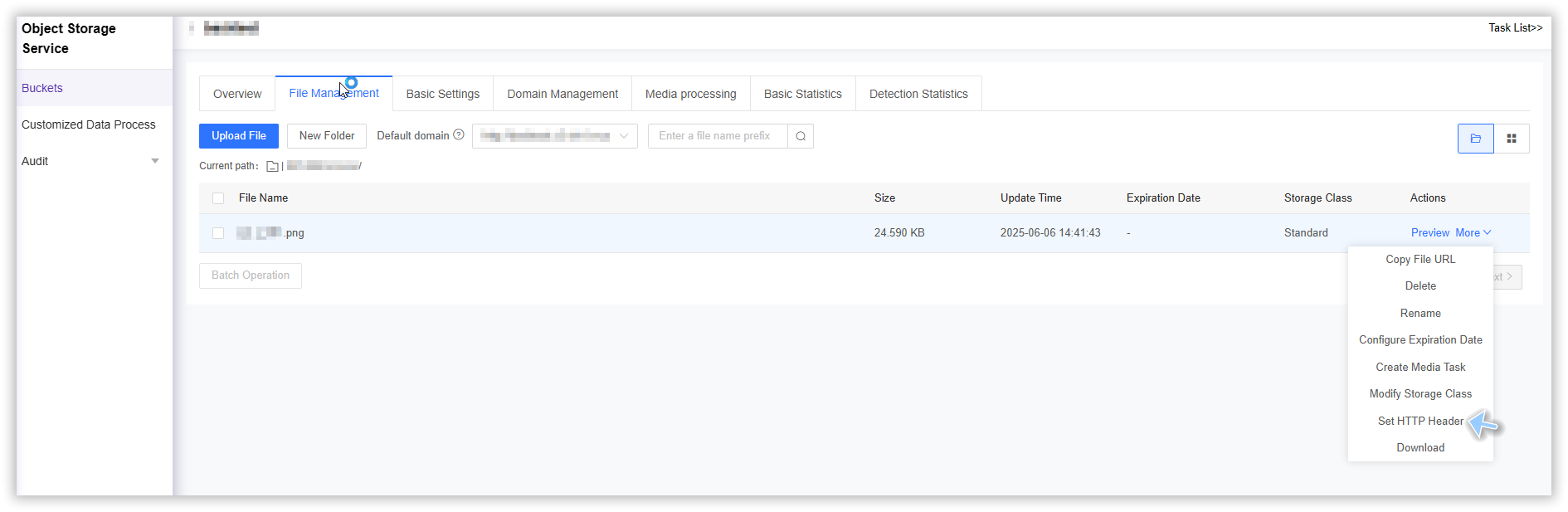
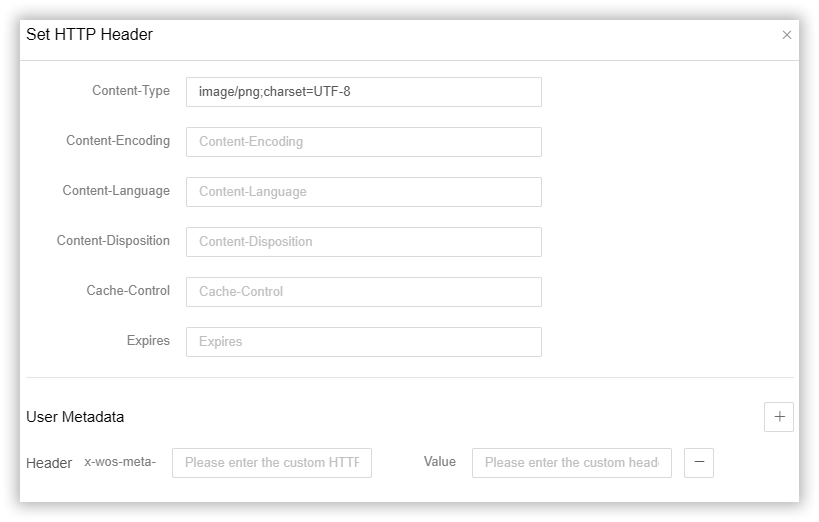
5.Configure custom metadata information:
- Content-Type: Indicates the media type (MIME type) of the entity body sent to the recipient.
- Content-Encoding: Indicates the data compression encoding method used by the entity body, such as gzip, deflate, etc.
- Content-Language: The natural language used to describe the resource, which helps in the selection and display of multilingual content.
- Content-Disposition: Indicates how the content should be presented, such as as an inline resource or as an attachment.
- Cache-Control: defines the cache mechanism for requests and responses and controls the cache policy for resources.
- Expires: Specifies the date and time when the resource expires, after which the cache will consider the resource invalid.
- x-wos-meta-*: customer-defined header
- Value: customer-defined value
6.Verify the response header
HTTP/1.1 200 OK
x-wos-request-id: 2028160194343259********116aj26CHUtsampled
Connection: close
Cache-Control: no-cache
Expires: 100
x-amz-meta-testheader: testValue
x-amz-storage-class: Standard
ETag: "FitGfwBENP7PTRbbLLXbC65kHFKu"
Last-Modified: Tue, 14 Jan 2025 07:21:12 GMT
Accept-Ranges: bytes C
ontent-Type: text/x-python;charset=UTF-8
Content-Length: 5249
Date: Tue, 14 Jan 2025 07:21:15 GMT
Connection: close
Server: WS-web-server