
Control Access Using Custom Request Headers
Last update:2026-04-21 17:39:07
Custom header blocklists and allowlists allow you to define specific HTTP headers that requests to your content on CDN must match. This mechanism ensures that access is granted only to requests from authorized headers or those with particular header values, effectively blocking hotlinking and safeguarding your valuable content.
How to Set Up Custom Header Access Rules
- Log in to the CDNetworks Console and select the appropriate product.
- Go to the Configuration, locate the domain you wish to configure, and click Edit Configuration
 .
. - Navigate to Access Control - Header Access List in the left sidebar and click Add.
- Configure the settings as follows based on your needs.
Apply to
This defines the scope of requests that Custom Header Blocklist or Allowlist will apply to. You can choose from the following options:
| Setting | Description |
|---|---|
| All Requests | The access control rule applies to all types of requests. |
| Only Homepage | Applies only to the root directory of the domain, such as http://domain/ or https://domain/. |
| Specific File Type | Applies only to specific types of files. You can select from the predefined file types on the left or define custom file types. Separate multiple custom types with a semicolon ; (e.g., jpg;png). |
| Specific URL Path | Applies only to requests for content at a specific URL path. Two URL path matching options are available:Full URL Path: Complete URL path, including parameters (e.g., path/index.html?abc=123). Ignore Query String: URL path without query parameters (e.g., path/index.html). |
| Specific Directory | Applies to requests under specific directories. For example, /file/abc/ applies to all content under http://domain/file/abc/*.Note: Directories must start and end with /, and can only contain letters, numbers, and certain special characters (underscore, hyphen, percent sign, dot). Multiple directories are supposed to be separated with line breaks. |
| URL Pattern (Regex) | Uses regular expressions to control the scope for the requests that the rules will be applied to. For example, the pattern *.jpg$ ensures that access control applies to all URLs ending with .jpg. |
Advanced Scope Conditions
You can further refine the rule’s scope using Advanced Scope Conditions. This will intersect with the basic Apply to for precise control. Select one or more parameters to form an AND relationship with the basic rules to target specific requests or responses.
| Parameter | Description |
|---|---|
| Region or Exclude Regions | Supports direct search selection from the list of countries/regions provided by CDNetworks; For Mainland China, it is possible to select specific provinces or larger geographical areas, such as East Region and Southwest Region. |
| Exclude File Type | Excludes certain file types. Separate multiple types with ;. |
| Exclude Custom File Type | Excludes custom file types as needed. Separate multiple types with ;. |
| Exclude Directory | Excludes specific directory paths. Paths must start and end with /. Separate multiple directories with ;. |
| Exception URL (Regex) | Excludes URLs using regex, e.g., .*\.jpg$. |
| Access-Control-Allow Methods | Matches HTTP request methods. Separate multiple methods with ;, e.g., GET;POST. |
| Exclude Request Method | Excludes specific HTTP request methods. |
Rule Type
You can configure the custom header blocklist or allowlist according to specific needs.
| Settings | Description |
|---|---|
| Blocklist | When setting up a blocklist, you need to specify the custom request headers and their corresponding values that are not allowed:Blocked Header Names: This is the name of the custom HTTP request header that needs to be validated. Please note that each blocklist can only include one header name.Blocked Header Values: These are the forbidden header values. If these values are present in the request, access will be denied. You can set multiple prohibited values, separated by ;. |
| Allowlist | When setting up an allowlist, just like the blocklist, you need to specify the custom request headers and their corresponding values that are allowed:Allowed Header Name: This is the name of the custom HTTP request header that needs to be validated. Similarly, each allowlist can only include one header name.Allowed Header Values: These are the permitted header values. Access is only allowed if these values are present in the request. You can set multiple allowed values, separated by ;. |
The system allows only one custom header allowlist, which can contain only one custom header name. If you need to include multiple custom headers, please contact our Customer Service for assistance.
Apply Rule to
Only for Client Request, referring to validating specific HTTP headers in requests issued from a client (such as a user’s browser or application) to ensure they meet preset rules.
Action
Decide how to handle requests that do not meet the specified rules:
- Block Access: Returns a 403 error for requests that fail validation.
- Redirect: Redirects requests that fail validation to a specified URL.
Case-Insensitive Match
The default for this setting is Yes.
- The Yes option indicates that the Apply to will be case-insensitive. Requests that differ only in letter case will still match. For example, if you set the scope to
http://domain/a.jpg, bothhttp://domain/a.jpgandhttp://domain/A.jpgwill trigger the rule. - Conversely, if you choose No, the rule will only apply to incoming requests that exactly match the capitalization specified in your Apply to settings.
Priority
When multiple access control rules are configured, the CDN prioritizes them based on their numerical value, executing higher numbers first.
After setting up, click Confirm and then Next to submit your settings. To prevent disruptions to your production environment, we recommend a pre-deployment in a test environment to verify the correctness of your settings. Once verified, click Direct Deployment to apply the settings live, typically taking effect within 3-5 minutes. For more details on pre-deployment testing, please refer to the tutorial on Verifying Configurations Through Pre-Deployment.
Best Practices
Example 1: Configuring a Custom Header Blocklist
Deny access if client requests include the header Test-Header with values key1 or key2.

Example 2: Configuring a Custom Header Allowlist
Allow access only if client requests include the header Test-Header with values key1 or key2.

Notes
Please DO NOT configure both custom header blocklist and allowlist simultaneously, as it may lead to all CDN accesses being denied, impacting your online operations. For instance, if both blocklist and allowlist configurations are set for the same header, it could result in all requests being denied.
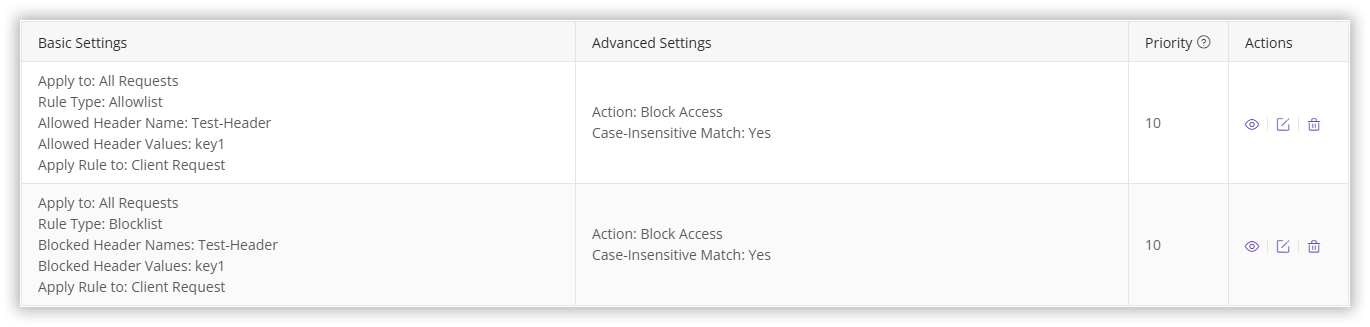
Why might all access be denied?
- If a request contains the header
Test-Headerwith valuekey1, it matches the blocklist rule, resulting in denied access. - If a request contains the header
Test-Headerwith a value other thankey1, it won’t be blocked by the blocklist but will fail to meet the allowlist (which allows only theTest-Headerwith value ofkey1), resulting in access being denied.
If you need to configure both a blocklist and an allowlist, please contact our Customer Service for assistance to ensure proper setup.