
SSO Basic Process
Last update:2026-03-25 15:25:30
After completing the SSO configuration, enterprise employees can log in to the CDNetworks Console using the method shown in the following image.
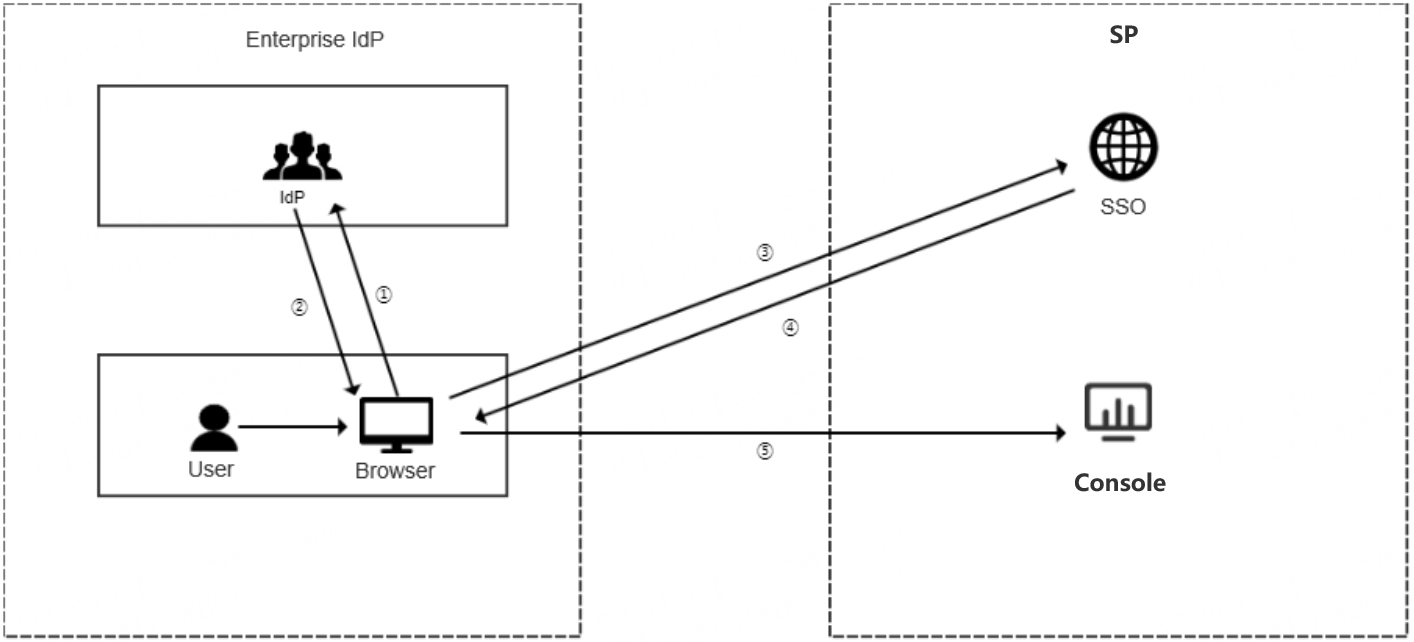
Process Description:
- The enterprise user selects CDNetworks as the target service on the IdP login page using their browser, and the IdP performs identity verification for the target service provider.
- The IdP verifies the user’s identity. Once authentication is successful, a SAML response is generated and returned to the browser.
- The browser is redirected to the CDNetworks SSO service page and the SAML response is forwarded to the SSO service. The SSO sign-in process begins. If the SAML response includes attributes mapped to multiple CDNetworks accounts, the system will automatically select the first account to access CDNetworks.
- Upon successful verification, the login status is returned.
- The browser is redirected to this URL to log in to the CDNetworks console with the specified account identity.
Configuration Steps:
- Upload your enterprise IdP metadata document to CDNetworks to establish a trust relationship with the enterprise IdP. For detailed configuration, please refer to SAML Configuration for SP.
- Download the CDNetworks metadata document and upload it to your enterprise IdP to establish a trust relationship from the enterprise IdP to CDNetworks. For detailed configuration, please refer to SAML Configuration for IDP.
- Configure the SAML assertion attributes forwarded by the enterprise IdP to CDNetworks to complete CDNetworks login authentication. For detailed configuration, please refer to SAML Response of SSO.
- Create CDNetworks sub-accounts and adjust SAML assertion attributes based on login accounts to enable enterprise IdP account management. For detailed configuration, please refer to SSO Account Management.
Is the content of this document helpful to you?
Yes
I have suggestion