
CDNPro Authorized Users
Last update:2026-03-25 15:17:40
This article describes how to grant users CDN Pro permissions.
Grant CDN Pro permissions to an IAM user
To authorize CDN Pro permissions for an IAM user, follow these steps:
1. Log in to the CDNetworks Management Console and enter IAM access control;
2. Click [Personnel Management] - [User];
3. Find the user who needs authorization by logging in to the account/display name, and click [CDN Pro Authorization];

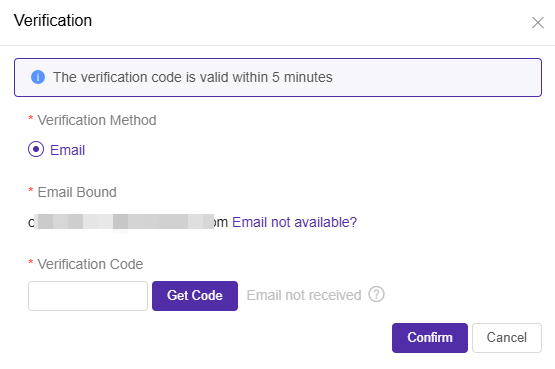
4. Identity verification is required before authorization;
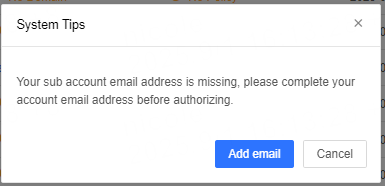
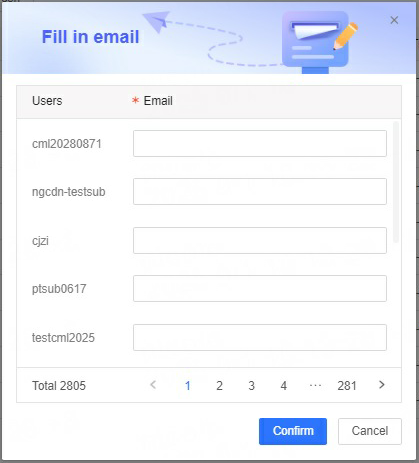
5. After identity authentication is passed, if your Sub-account email address is missing, you need to complete all Sub-account email addresses before authorization;
(1)Click [Add Email]
(2) Fill in the Sub-account email address
6. Enter the CDN Pro authorization page and select the function permissions that need to be associated;
- Operation: Find the function that needs to be authorized and check the permission;
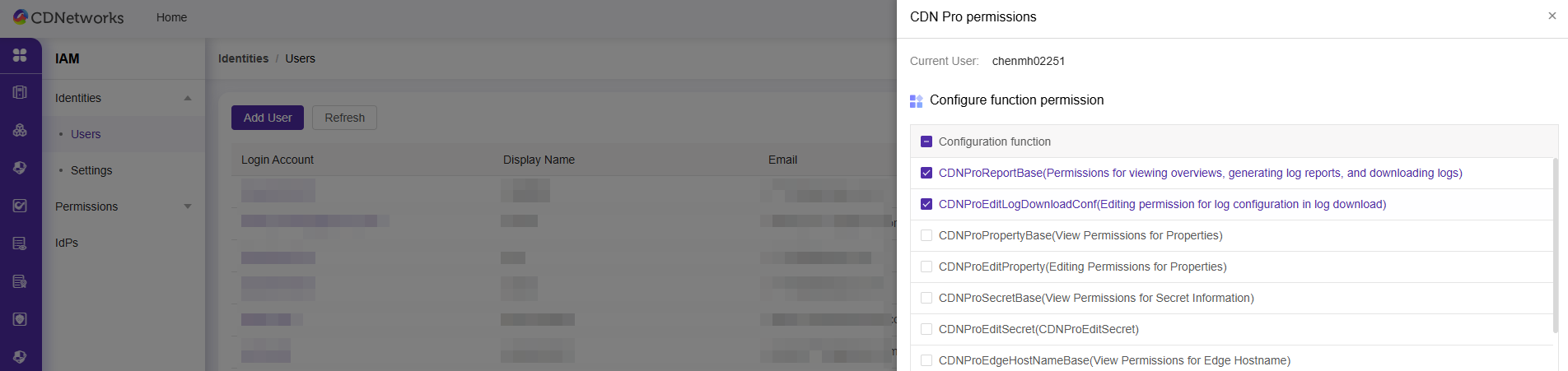
- Function permission list:
| Functional modules | Permissions | Corresponding function permission name |
|---|---|---|
| Overview | Check | CDNProReportBase (viewing permissions for overview, log reports, and log downloads) |
| Log Report-Report | Check | CDNProReportBase (viewing permissions for overview, log reports, and log downloads) |
| Log Report-Log Download-Log Download | Check | CDNProReportBase (viewing permissions for overview, log reports, and log downloads) |
| Log report-log download-log configuration | Check | CDNProReportBase (viewing permissions for overview, log reports, and log downloads) |
| Log report-log download-log configuration | edit | CDNProEditLogDownloadConf (editing permissions for log configuration of log download) |
| Edge Configuration-Acceleration Project | Check | CDNProPropertyBase (accelerated project viewing permissions) |
| Edge Configuration-Acceleration Project | edit | CDNProEditProperty (accelerated project editing permissions) |
| Edge Configuration-Confidential Information | Check | CDNProSecretBase (confidential information viewing permission) |
| Edge Configuration-Confidential Information | edit | CDNProEditSecret (privilege information editing permission) |
| edge hostname(s) | Check | CDNProEdgeHostNameBase (edge hostname(s) viewing permission) |
| edge hostname(s) | edit | CDNProEditEdgeHostName (edge hostname(s) editing permission) |
| Certificate | Check | CDNProCertificateBase (Certificate Viewing Permissions) |
| Certificate | edit | CDNProEditCertificate (Certificate Editing Permission) |
| Content Management - Refresh | Check | CDNProContentBase (content management refresh view permissions) |
| Content Management - Refresh | edit | CDNProEditContent (content management refresh editing permissions) |
| Content Management - Prefetch | Check | CDNProContentPrefetch (Content Management Refresh Edit Permissions) |
| Content Management - Prefetch | edit | CDNProEditContentPrefetch (Content Management Prefetch View Permission) |
| View Tasks | Check | CDNProStandbyTaskBase (deployment task viewing permission) |
| View Tasks | edit | CDNProEditStandbyTask (deployment history editing permission) |
| Back-to-origin IP management | Check | CDNProStandbyTaskBase (deployment task viewing permission) |
| Media Processing | Check | CDNProVodService (media processing permissions) |
7. Select the resource permissions that need to be associated;
- Supported resource permissions: (1) Acceleration projects; (2) edge hostname(s);
- Operation: Select the acceleration project/ edge hostname(s) that needs to be authorized.
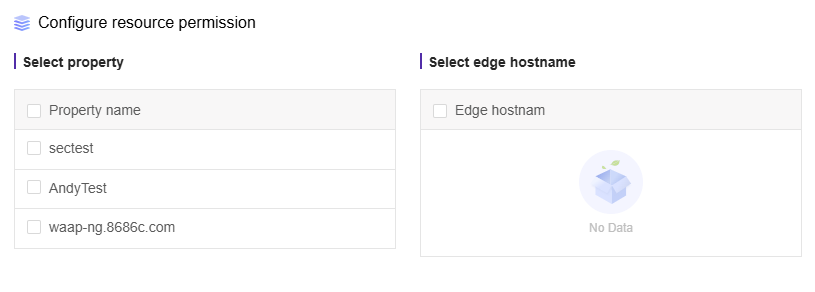
8. Click [OK] to save the permissions successfully.
View the CDN Pro permissions that the IAM user has authorized
Steps: Find the IAM user you want to view and click [CDN Pro Authorization] to enter the CDN Pro authorization page.
Modify/remove CDN Pro permissions for IAM users
To modify authorization or remove CDN Pro for an IAM user, follow these steps:
1. To modify/remove permissions granted to IAM users, click [CDN Pro Authorization] to enter the CDN Pro authorization page;
2. Uncheck the permissions that need to be removed, check the permissions that need to be added, and click [OK] to take effect.