
Lifecycle Settings
Last update:2025-08-06 11:04:53
Object storage is categorized into three types based on file access frequency: Standard Storage, Infrequent Access Storage, and Archive Storage. Files in these three storage types have different lifecycles. Object Storage Lifecycle Management is an automated data management feature that allows users to set automatic lifecycle rules for objects (files) in storage spaces based on their data storage requirements. Without manual intervention, the system can automatically perform operations such as data migration and deletion. By managing object lifecycles through lifecycle rules, data type conversion is automated, transferring less frequently accessed data to lower-cost storage types. This approach is highly beneficial for optimizing storage resource utilization and reducing costs.
Creating Lifecycle Rules
- Log in to the CDNetworks Console and select Object Storage Service.
- Click the Name of the bucket you want to manage, or click Manage on the far right of the corresponding bucket.
- On the details page, click Basic Settings in the upper section.
- In the Basic Settings page, find Lifecycle Settings and click the blue Create Rule button.
- Complete the configuration in the corresponding page as required.
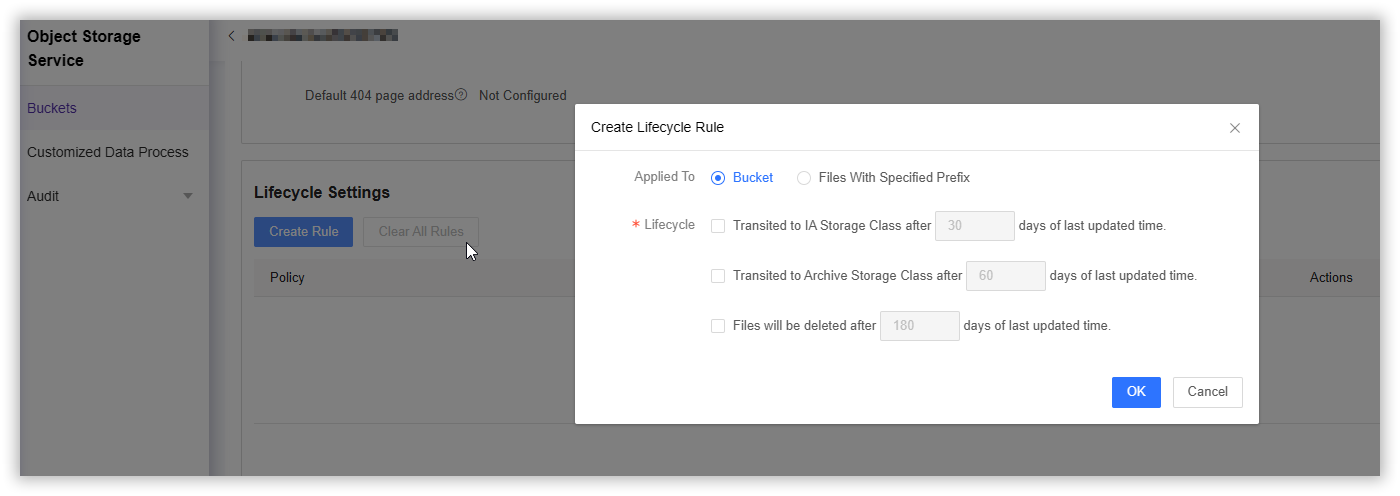
(Policy) Applied To
- Bucket: Applied to the entire bucket when selected. This rule can only be set once, and cannot appear simultaneously with rules for specified prefixes.
- Files With Specified Prefix: When selected, this rule is applied only to the specified prefix. Multiple rules can be set, and you can enter your specified prefix in the corresponding input box after selection.
Lifecycle
The three lifecycle rules can be multi-selected, and the selected data type conversion days can be custom modified. It is important to note that the last updated days of the three rules should be incremented in order.
Note: Currently, lifecycle rules support converting files from Standard Storage to Infrequent Access Storage or Archive Storage, but do not support reverse conversion. For reverse conversion, please manually set the file storage type via the console or the API.
Editing/Deleting Lifecycle Rules
After rules are created, you can Edit and Delete them in the rules list. Please note that the Clear All Rules button will delete all the rules you have configured at once, so use it with caution.
