
Customized Data Process
Last update:2025-08-11 11:35:01
Custom data processing services in object storage allow users to configure an APP Name, Service Address, and Description, enabling them to customize and deploy their data processing tasks. By forwarding processing requests through specified interfaces to user-configured service addresses, this service architecture offers flexibility to meet diverse user data processing needs. In this way, CDNetworks Object Storage can better support user-specific application scenarios.
How It Works
This function allow customers to deploy custom data processing services, that is, customers deploy their own data processing software on cloud hosts, and CDNetworks Object Storage forwards file processing requests to customer-defined data processing services. The service flow diagram is as follows

User’s Instructions
Service Deployment
Customers set up and run their data processing programs (such as image processing/file encryption, etc.) on their cloud hosts and then obtain the public access service address (Service Address) for this program. This address is generated by customer-developed deployment and is a required prerequisite for configuring services in the object storage console.
The service address is an outcome of the customer’s self-deployed service, rather than being directly generated through the console. The console only provides an entry point to register this address.
Note:
The service address receives two parameters: cmd&url, cmd is the customer’s custom service name, url is the file download address.
Configuring Custom Data Processing Services through the Console
- Log in to the CDNetworks Console and select Object Storage Service.
- On the Object Storage service page, locate Customized Data Process and click New Rule.
- In the corresponding window, enter the configuration information as prompted to complete the rule creation, then click Confirm to finish.
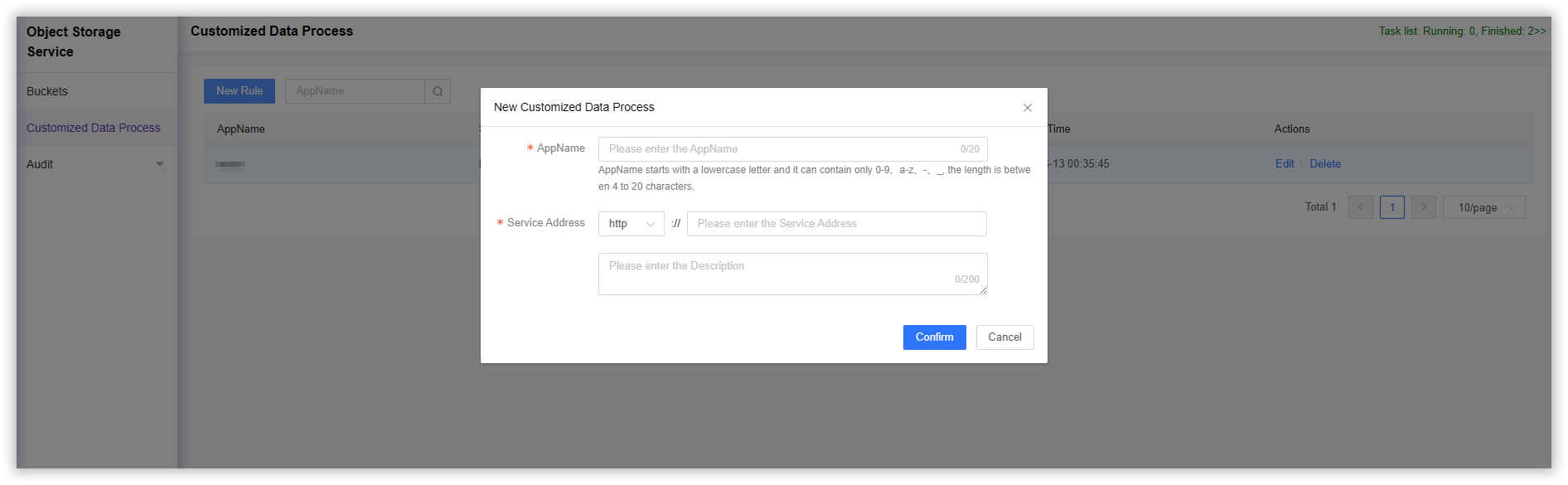
- AppName: Fill in the name of the custom data processing service, which will be forwarded to the customer’s custom data processing service through cmd later.
- Service Address: Enter the external access address of the customer-defined data processing service, which is obtained during the service deployment operation.
- Description: fill in the description information
Service Invocation
1. User Initiates a Request with Parameters
URL format specification:
http://<file_url>?ufop=<AppName>
2.After CDNetworks Object Storage get the ufop request, it will actively forward the request to the customer-defined data processing service
The forwarding format is as follows:
post service_address?cmd=<AppName>&url=<file_url>
Note: file_url uses URL-encoded encoding and must first be decoded using URLdecode
3. Perform Custom Service Processing and Return Results to the User
Note: The return data, error code is defined by the app.
Parameter Description:
| Parameter | instruction | Is it required |
|---|---|---|
ufop |
Custom data processing service name | Yes |
file_url |
The download address of the file, which consists of the space-bound domain name/file name | Yes |