
SSO Basic Process
最終更新日:2026-03-25 15:21:40
After the enterprise completes the relevant SSO configuration, employees can log in to the CDNetworks Console using the method shown in the diagram below.
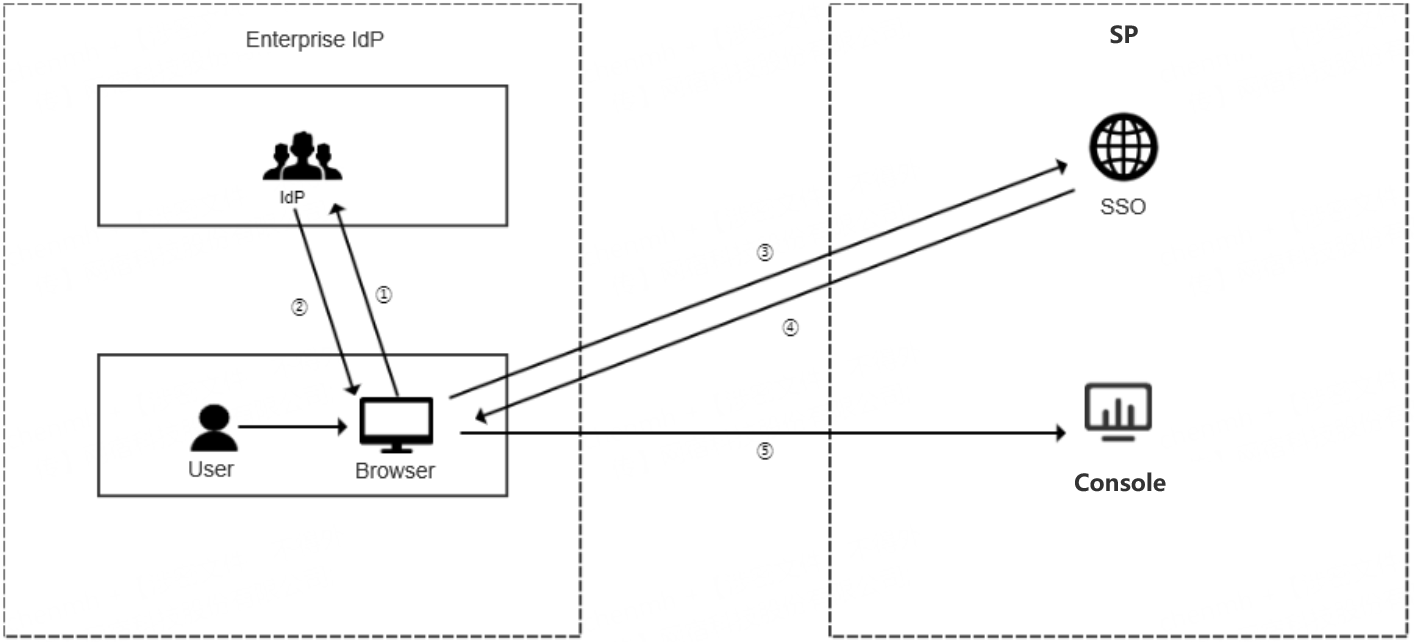
Process Description:
- The enterprise user uses a browser to select CDNetworks as the target service on the IdP’s login page. The IdP performs identity verification for the target service provider.
- The IdP verifies the user’s identity. Upon successful authentication, it generates a SAML response and returns it to the browser.
- The browser is redirected to the CDNetworks SSO service page and forwards the SAML response to the SSO service to initiate the SSO login process.
- Once authentication is successful, the login status is returned.
- The browser is redirected to this URL to log in to the CDNetworks Console with the specified account identity.
Configuration Steps:
- Upload the enterprise IdP metadata document to CDNetworks to establish a trust relationship from CDNetworks to the enterprise IdP. For detailed configuration, please refer to SAML Configuration for SP.
- Download the CDNetworks metadata document and upload it to your enterprise IdP to establish a trust relationship between the enterprise IdP and CDNetworks. For detailed configuration, please refer to SAML Configuration for IDP.
- Configure the SAML assertion attributes that the enterprise IdP forwards to CDNetworks to complete CDNetworks login verification. For detailed configuration, please refer to SAML Response of SSO.
このドキュメントの内容は役に立ちましたか?
はい
いいえ