
Token Generator
Last update:2026-04-22 17:57:13
The Token Generator allows you to quickly generate authenticated URLs for various authentication modes based on specific configurations. You can use these URLs to verify if the configured token authentication meets your requirements.
We recommend deploying the token authentication configuration to a staging environment first. Then, use the Token Generator to generate authenticated URLs for validation, to prevent any potential misconfigurations from affecting the production environment.
How to Use the Token Generator
- Log in to the CDNetworks Console, locate the domain you wish to configure, and click Edit Configuration
 .
. - In the left navigation bar, select Access Control - Token Authentication - Token Generator.
- Choose the appropriate Authentication Mode based on your needs and configure the required information for the authentication.
- After filling in the configuration details, click Generate. The system will automatically generate the corresponding authenticated URL for you.
Example
Here is an example of generating an authenticated URL for Mode A. The original URL requiring authentication is:
http://domain.com/browse/index.html
Based on the requirements, the Token Authentication is supposed to be configured as follows:
- Access path (URI): The actual access path of the content in the URL, which corresponds to the
uriparameter in the token authentication configuration. In this example, the path is/browse/index.html. - Secret Key ($ourkey): The key used to calculate the authentication signature. In this example, we use
cdnw_secret. - Timestamp Format: The format of the timestamp. Here, we use the decimal Unix timestamp by selecting
Unix Timestamp (Decimal). - Signature Parameters: The method for calculating the authentication signature. In this example, we want to calculate the authentication signature based on the path-key-timestamp method. Therefore, it is specified as
$uri$ourkey$time. - Expiration Time (seconds): The validity period of the authentication parameters. In this example, the authentication information is valid for 5 minutes after the authenticated URL is generated, so we enter
300.
Once the parameters are entered, the system will automatically generate the authenticated URL for you, as shown below:
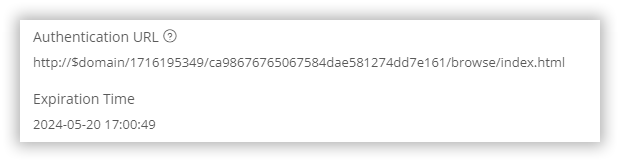
You can use the generated URL http://$domain/1716195349/ca98676765067584dae581274dd7e161/browse/index.html to send a request to the CDN edge server. If the request is made within 5 minutes and the authentication information is validated successfully, the CDN edge server will respond with the content to the client. After 5 minutes, as the authentication information expires, the response will be rejected, and a 403 status code will be returned to the client. This demonstrates that the token authentication configuration is correct.
Please note that the
$domainin the generated URL is just an example and not the actual domain name used in the request. For actual use, you need to replace it with the domain you have added on the CDN platform.