
Multipart Upload
Last update:2025-08-18 15:31:56
The multipart upload capability supports splitting a file into a series of data chunks of a specific size, uploading these data chunks separately onto the server side respectively, and then merging all these data chunks into a resource at the server side upon completion of the upload of all chunks.
Key Constraints :
1. Return Value Mechanism: Multipart upload supports only the returnBody mode, and does not support the returnUrl mode.
2. Mandatory File Name: The file key must be specified (can be set via upload policies or request headers, with upload policies having higher priority).
3. Domain Type: The upload domains provided by the object storage are ordinary domains.
Key Concepts
Multipart upload introduces a two-level structure:
- Block: The building unit of the resource.
- Chunk: The building unit of a block.
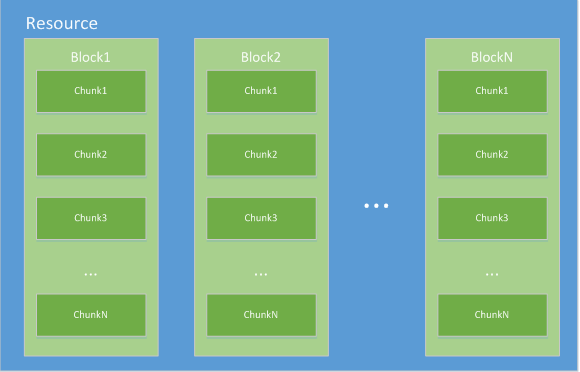
NOTE: The server side of the object storage will periodically clear the blocks and chunks that have not been merged into files after being uploaded, approximately once every month.
Basic Process
The APIs related to the multipart upload include: Create block (mkblk), upload chunk (bput), and create file (mkfile). The multipart upload process is as shown below:
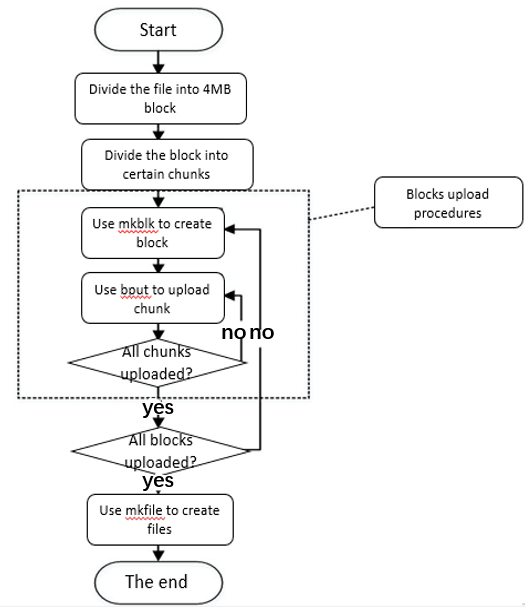
Wherein, the key points are as follows:
- Split the file to be uploaded into several blocks according to a set block size (such as 4MB). The actual size shall apply for the last block of the file. There will be only one block if the file is smaller than the set block size.
- The set block size must be a multiple of 4MB, such as 4MB, 8MB, and 12MB. Otherwise, the calculation of the ETag value of a file will be affected.
- Split each block into several chunks according to the predefined chunk size, create a corresponding block at the server side by calling mkblk, upload all remaining chunks completely by calling bput, and finally complete the upload of an entire block.
- Upon completion of the upload of all blocks, merge the information of these uploaded blocks into a resource file according to the specified sequence by calling mkfile so as to complete the multipart upload process of the entire resource.
Resuming Upload from Breakpoint
Resume upload from breakpoint can be implemented by utilizing the multipart upload capability.
For every chunk uploaded successfully during the multipart upload process, the client will always receive progress information returned from the server side that shows how many chunks have been uploaded so far, and therefore will know which chunk will need to be uploaded next. Although chunks that have already been uploaded successfully are not stored at the server side permanently, these are already enough for implementing the resume-upload-from-breakpoint mechanism.
To implement resume upload from breakpoint, the client is required to always make such progress information persistent locally every time it is received. In this way, even if the user side program crashes unexpectedly or reboots normally, it can always continue transmitting remaining chunks at the time of startup. By utilizing the resume-upload-from-breakpoint capability, the client can pause or resume the upload process of a certain file.
Concurrent Upload
During a multipart upload, all chunks that have been split inside each block can only be uploaded one by one in sequence, with all blocks being independent of each other. Therefore, several blocks can be transmitted simultaneously without interfering with one another. This feature enables concurrent uploads to be implemented.
Create Block
Creates a new block for subsequent multipart uploads, and uploads the first chunk of data at the same time.
Request Description
POST /mkblk/<blockSize>/<blockOrder>
    Host: <UploadDomain>
    Authorization:<UploadToken>
    Content-Length:<firstChunkSize>
    Content-Type:application/octet-stream
    UploadBatch:<uuid>
    Key:<key>
    <firstChunkBinary>
Header Description
| Parameter | Required | Description |
|---|---|---|
| Host | Yes | Upload Domain Name, which can be obtained from the Console Overview interface. |
| Authorization | Yes | Upload Credential |
| Content-Length | Yes | Length of the content of the first chunk, unit: Bytes. |
| Content-Type | Yes | Fixed as application/octet-stream. |
| UploadBatch | Yes | Multipart upload task ID, UUID random string. Different IDs will be used for the multipart upload of different files. Use the same UploadBatch for the same multipart upload task |
| Key | No | Custom File Name. It must beURL-Safe Base64 Encoded . |
Parameter Description
| Parameter | Required | Description |
|---|---|---|
| <blockSize> | Yes | Block size, which must be a multiple of 4MB (such as 4MB, 8MB, 12MB...); the actual size is used for the last block. Unit: Bytes. |
| <blockOrder> | Yes | Numbering of blocks in the sequence, which starts from 0. |
Request Content
Binary content of the first chunk.
<firstChunkBinary>
Response Description
- If a request is successful, a JSON string of the following content will be returned:
  {
        "ctx":          "<Ctx           string>",
        "checksum":     "<Checksum      string>",
        "crc32":         "<Crc32         int64>",
        "offset":        "<Offset        int64>"
    }
| Field name | Required | Description |
|---|---|---|
| ctx | Yes | Block-level upload control information created upon the success of this upload, which will subsequently be used for uploading chunks and generating the file. This field is an opaque field that can only be used by the CDNetworks Object Storage server for understanding, and the upload end should not modify the content. The <ctx> returned each time will always only correspond to the next data chunk uploaded immediately after the chunk. The 401 status code will be returned if a non-corresponding data chunk is uploaded. |
| checksum | Yes | Upload block verification code. |
| crc32 | Yes | Upload block Crc32. You can use this field to verify the integrity of the upload block. |
| offset | Yes | Offset of the next upload chunk in the split block. If the chunk size equals the block size, then the said return value will be the size of the current block. |
- If a request fails, a JSON character string of the following content will be returned:
 {
            "code":     "<code string>",
            "message":  "<message string>"
    }
| Field name | Required | Description |
|---|---|---|
| code | Yes | HTTP request response code. Refer to the HTTP Response Status Code |
| message | Yes | Prompt message. |
Example
curl -v -X POST --data-binary "@/home/test/0" -H "Authorization:86622e227a50d49d858c2494a935bc2e4ac543a7:ZTIzYjFiZmFkYWRjODdiNjJlMTI4NDgyZGI1MGJmMWYzZGE2MjllNA==:eyJzY29wZSI6ImltYWdlczpzbGljZS50eHQiLCJkZWFkbGluZSI6IjE0Mzg1ODg0MDYxMDkiLCJvdmVyd3JpdGUiOjAsImZzaXplTGltaXQiOjEwNzM3NDE4MjQsImluc3RhbnQiOjB9" -H "Content-Type:application/octet-stream" -H "Content-Length:4194304" -H "UploadBatch:abcdabcd-abcd-abcd-abcd-abcdabcdabcd"--url "http://uploadDomain/mkblk/4194304/0"
Upload Chunk
Uploads a chunk of data of the specified block. The specific data volume can be adjusted based on the field environment. All chunks of data of the same block must be uploaded in series.
Request Description
POST /bput/<ctx>/<nextChunkOffset>
    Host: <UploadDomain>
    Authorization:<UploadToken>
    Content-Length:<ChunkSize>
    Content-Type:application/octet-stream
    UploadBatch:<uuid>
    Key:<key>
    <ChunkBinary>
Header Description
| Parameter | Required | Description |
|---|---|---|
| Host | Yes | Upload Domain Name, which can be obtained from the Console Overview interface. |
| Authorization | Yes | Upload Credential |
| Content-Length | Yes | Length of the content of the current chunk, unit: Bytes. |
| Content-Type | Yes | Fixed as application/octet-stream. |
| UploadBatch | Yes | Multipart upload task ID, UUID random string. Different IDs will be used for the multipart upload of different files. Use the same UploadBatch for the same multipart upload task |
| Key | No | Custom File Name. It must be URL-Safe Base64 Encoded. |
Parameter Description
| Parameter | Required | Description |
|---|---|---|
| <ctx> | Yes | Block-level upload control information returned from the previous upload. |
| <nextChunkOffset> | Yes | Initial offset of current chunk in the entire block. |
Request Content
Binary content of the current chunk.
<ChunkBinary>
Response Description
- If a request is successful, a JSON string of the following content will be returned:
{
        "ctx":          "<Ctx           string>",
        "checksum":     "<Checksum      string>",
        "crc32":         "<Crc32         int64>",
        "offset":        "<Offset        int64>"
    }
| Field name | Required | Description |
|---|---|---|
| ctx | Yes | Block-level upload control information created upon the success of this upload, which will subsequently be used for uploading chunks and generating the file. This field is an opaque field that can only be used by the CDNetworks Object Storage server for understanding, and the upload end should not modify the content. The |
| checksum | Yes | Upload block verification code. |
| crc32 | Yes | Upload block Crc32. You can use this field to verify the integrity of the upload block. |
| offset | Yes | Offset of the next upload chunk in the split block. |
- If a request fails, a JSON character string of the following content will be returned:
{
       "code":     "<code string>",
       "message":  "<ErrMsg string>"
   }
| Field name | Required | Description |
|---|---|---|
| code | Yes | HTTP request response code. Refer to the HTTP Response Status Code |
| message | Yes | Prompt message. |
Example
curl -v -X POST --data-binary "@/home/test/0" -H "Authorization:86diNjJlMTI4NDgyZGI1MGJmMWYzZGE2MjllNA==:eyJzY29wZSI6ImltYWdlczpzbGljZS50eHQiLCJkZWFkbGluZSI6IjE0Mzg1ODg0MDYxMDkiLCJvdmVyd3JpdGUiOjAsImZzaXplTGltaXQiOjEwNzM3NDE4MjQsImluc3RhbnQiOjB9" -H "Content-Type:application/octet-stream" -H "Content-Length:2097152" -H "UploadBatch:abcdabcd-abcd-abcd-abcd-abcdabcdabcd" --url "http://uploadDomain/bput/34514eab06922ff67ac7a16cdd28e994/2097152"
Create file
Merges all uploaded data blocks into a resource file according to the specified sequence.
Request Description
POST /mkfile/<fileSize>/<UserParam>/<encodUserVars>
    Host: <UploadDomain>
    Authorization:<UploadToken>
    Content-Length:<ctxListSize>
    Content-Type:text/plain;charset=UTF-8
    UploadBatch:<uuid>
    Key:<key>
    MimeType:<mimeType>
    Deadline:<Deadline>
    <ctxList>
Header Description
| Parameter | Required | Description |
|---|---|---|
| Host | Yes | Upload Domain Name, which can be obtained from the Console Overview interface. |
| Authorization | Yes | Upload Credential. |
| Content-Length | Yes | The length of <ctx> and separator of all blocks, unit: Bytes. |
| Content-Type | Yes | Fixed as text/plain. |
| UploadBatch | Yes | Multipart upload task ID, UUID random string. Different IDs will be used for the multipart upload of different files. Use the same UploadBatch for the same multipart upload task |
| Key | No | Custom File Name. It must be URL-Safe Base64 Encoded. |
| MimeType | No | MIME-Type of custom file. |
| Deadline | No | File storage life. Files that exceed the number of storage days will be deleted automatically, unit: Days. For example: 1, 2, 3... NOTE: 0 indicates deletion as soon as possible. Configuration of 0 during file upload is not recommended |
Parameter Description
| Parameter | Required | Description |
|---|---|---|
| <fileSize> | Yes | Resource file size. |
| <UserParam> | No | Custom variable. Note that it must begin with x:. |
| <encodedUserVars> | No | Specifies the value of a custom variable. It must be URL-Safe Base64 Encoded. |
Request Content
The content of this request is a list obtained following the upload of the last data chunk of each data block, which is separated with the comma (,) and sorted according to its location in the source file.
Notes: No comma is needed after the last item in a list.
<lastCtxOfBlock1>,<lastCtxOfBlock2>,<lastCtxOfBlock3>,...,<lastCtxOfBlockN>
Response Description
- If a request is successful, a JSON string of the following content will be returned:
{
        "hash":"<ContentHash>",
        "key":"<Key>"
    }
| Field name | Required | Description |
|---|---|---|
| code | Yes | HTTP request response code. Refer to the HTTP Response Status Code |
| message | Yes | Prompt message. |
Example
curl -v -X POST -H 'Authorization:df115a7a498e873b74c2eab217e406a192f0ed14:NzJhMzRhODhhZTA5YjNmNjhkNWJlODY0MDI1NzQ0Nzc1OGExODkwNw==:eyJzY29wZSI6Indoai1zdHlsZS10ZXN0OmZlbnAt5L2g5aW9IUAjJiolZWUubXA0IiwiZGVhZGxpbmUiOiIyNDM4MDc4NjQ3ODMwIiwib3ZlcndyaXRlIjoxLCJmc2l6ZUxpbWl0IjoxMDczNzQxODI0LCJjYWxsYmFja1VybCI6Imh0dHA6Ly9kZW1vLmNvbTo4MS9jYWxsYmFja1VybCIsImNhbGxiYWNrQm9keSI6ImJ1Y2tldD0kKGJ1Y2tldCkma2V5PSQoa2V5KSZmbmFtZT0kKGZuYW1lKSZmc2l6ZT0kKGZzaXplKSZpcD0kKGlwKSZtaW1lVHlwZT0kKG1pbWVUeXBlKSZ1cmw9JCh1cmwpJmNvc3RUaW1lPSQoY29zdFRpbWUpJnVzZXJuYW1lPXdoaiZhZ2U9MTEmcG9zaXRpb249JCh4OnBvc2l0aW9uKSZtZXNzYWdlPSQoeDptZXNzYWdlKSIsImluc3RhbnQiOjB9' -H 'Content-Type:text/plain;charset=UTF-8' -H 'Content-Length:65' -H "UploadBatch:abcdabcd-abcd-abcd-abcd-abcdabcdabcd" --url 'http://uploadDomain/mkfile/6339685/x:position/bG9jYWw=/x:message/dXBsb2Fk' -d "c636ec95ef7a8889dec882ef7eb9306e,d7243df51cb880e11c107088ce942f9c"