
Multipart Upload
Last update:2025-12-26 17:32:31
The Multipart Upload allows you to split a single video into multiple parts (blocks) and upload them concurrently or sequentially. This method is recommended for uploading large videos as it offers better reliability and supports resuming uploads (breakpoint continuation).
1. Overview & Concepts
To successfully upload a video using this method, you need to understand two key concepts: Blocks and Chunks.
- Block: The video is divided into blocks of a fixed size.
- Size Constraint: The block size must be a multiple of 4 MB (e.g., 4 MB, 8 MB, 12 MB). This is critical because the server uses this alignment to calculate the ETag and checksums. Deviating from this size will result in validation errors.
- Last Block: The final block is the actual remaining size of the video (it does not need to be a multiple of 4 MB).
- Small Videos: If the entire video is smaller than the configured block size, the video consists of a single block.
- Chunk: Inside each block, data is uploaded sequentially in “chunks”. A chunk is a slice of data within a block used for transmission.
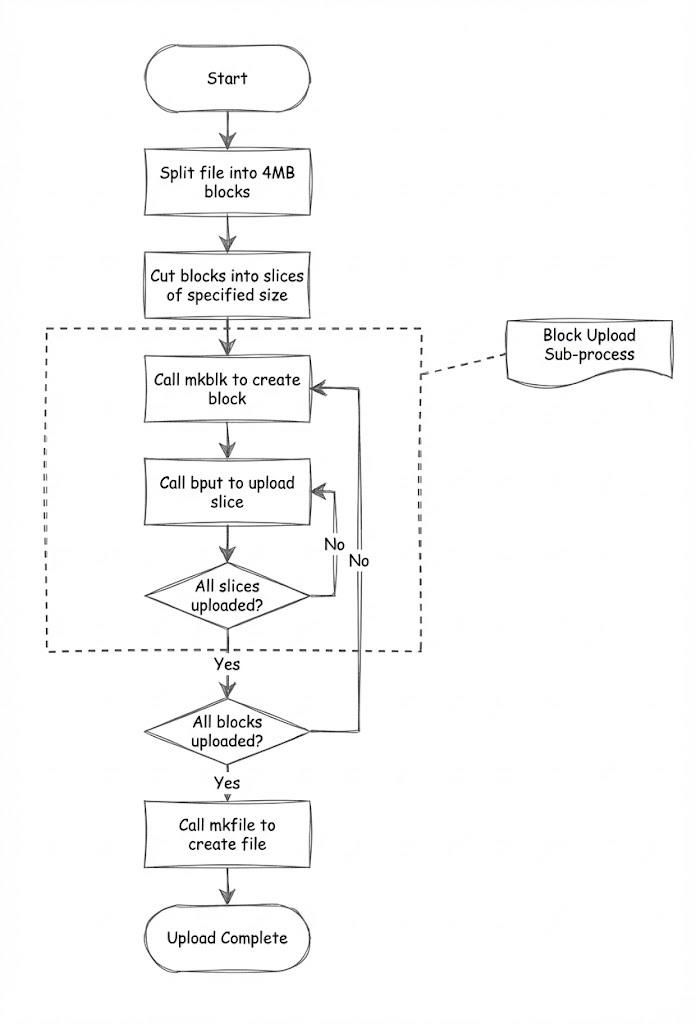
Basic Workflow:
- Split Video: Divide the entire video into blocks based on the chosen size (must be a multiple of 4 MB).
- Slice Blocks: Further divide each block into smaller “chunks” for transfer.
- Initialize Block (
/mkblk): Create the corresponding block on the server by uploading its first chunk. - Upload Remaining Chunks (
/bput): Upload all subsequent chunks for that specific block until the block is complete. - Repeat: Perform steps 3 and 4 for every block in the video (blocks can be uploaded in parallel).
- Merge (
/mkfile): Once all blocks are uploaded, instruct the server to combine the block information in the specified order to form the final video.
2. Prerequisites
Before calling any endpoints in this document, you must obtain upload credentials.
- Call the Get Upload Token (
/vod/videoManage/getUploadToken). - Extract the following values from the response to use in the Multipart Upload requests:
| Value from Token Response | Maps to Multipart Header/Parameter | Description |
|---|---|---|
uploadUrl |
Host (Base URL) | The domain where you will send upload requests. |
uploadToken |
Authorization | The verification token for the upload request. |
fileKey |
Key | The unique identifier/path for the video storage. |
3. API Reference
Step 1: Create Block & Upload First Chunk
This endpoint initializes a new block and uploads the first chunk of data for that block.
Endpoint:POST <uploadUrl>/mkblk/<BlockSize>/<BlockIndex>
Path Parameters
| Parameter | Type | Required | Description |
|---|---|---|---|
BlockSize |
Integer | Yes | The size of the block in bytes. Must be a multiple of 4 MB (4194304), except for the last block which is the actual remaining size. |
BlockIndex |
Integer | Yes | The zero-based index of the block (e.g., 0 for the first block, 1 for the second). |
Request Headers
| Header | Value | Required | Description |
|---|---|---|---|
Authorization |
String | Yes | The uploadToken obtained from the Get Upload Token API. |
Content-Length |
Integer | Yes | The size of the current chunk being uploaded (in bytes). |
Content-Type |
String | Yes | Fixed value: application/octet-stream. |
UploadBatch |
UUID | Yes | A random UUID string generated by the client to identify this specific video upload session. Use the same UUID for all requests regarding this video. |
Key |
String | Yes | The fileKey (or target video path). Can also be specified in the upload policy. |
Request Body
- Binary Data: The raw binary content of the first chunk.
Response Example
{
    "ctx": "ExampleContextStringForNextChunk...",
    "checksum": "checksum_string",
    "crc32": 123456789,
    "offset": 4194304
}
- ctx: Context string required for the next
bputrequest. Must be preserved by the client to link the next chunk. - checksum: The checksum of the uploaded block.
- crc32: The CRC32 value of the uploaded block. You can use this to verify the integrity of the uploaded data.
- offset: The next expected offset for this block.
Step 2: Upload Subsequent Chunks
Use this endpoint to upload the remaining chunks for a specific block. You must repeat this call until the current block is completely uploaded.
Endpoint:POST <uploadUrl>/bput/<Ctx>/<NextChunkOffset>
Path Parameters
| Parameter | Type | Required | Description |
|---|---|---|---|
Ctx |
String | Yes | The context string returned by the previous /mkblk or /bput response. This links the chunk to the correct block. |
NextChunkOffset |
Integer | Yes | The starting offset of the current chunk within the block. This matches the offset returned in the previous response. |
Request Headers
| Header | Value | Required | Description |
|---|---|---|---|
Authorization |
String | Yes | The uploadToken. |
Content-Length |
Integer | Yes | The size of the current chunk being uploaded (in bytes). |
Content-Type |
String | Yes | Fixed value: application/octet-stream. |
UploadBatch |
UUID | Yes | The same UUID used in Step 1. |
Key |
String | Yes | The fileKey. |
Request Body
- Binary Data: The raw binary content of the current chunk.
Response Example
{
    "ctx": "ExampleContextStringForNextChunk...",
    "checksum": "checksum_string",
    "crc32": 123456789,
    "offset": 8388608
}
- ctx: Updated context string required for the next
bputrequest. - checksum: The checksum of the uploaded block.
- crc32: The CRC32 value.
- offset: The next expected offset for this block.
Step 3: Complete Upload (Make Video File)
Once all blocks have been successfully uploaded, call this endpoint to merge them into the final video.
Endpoint:POST <uploadUrl>/mkfile/<FileSize>
Note: You can append optional parameters to the URL format: <uploadUrl>/mkfile/<FileSize>/x:<UserParam>/<EncodedValue>.
Path Parameters
| Parameter | Type | Required | Description |
|---|---|---|---|
FileSize |
Integer | Yes | The total size of the entire video in bytes. |
Request Headers
| Header | Value | Required | Description |
|---|---|---|---|
Authorization |
String | Yes | The uploadToken. |
Content-Type |
String | Yes | Fixed value: text/plain;charset=UTF-8. |
UploadBatch |
UUID | Yes | The same UUID used in previous steps. |
Key |
String | Yes | The fileKey. |
MimeType |
String | No | Custom MIME type for the video. |
DeleteAfterDays |
Integer | No | The number of days to retain the video. 0 implies immediate deletion (not recommended). |
Request Body
A comma-separated list of the final ctx string returned for each block, sorted strictly by the block index (e.g., Block 0, Block 1…).
Format:
<LastCtxOfBlock0>,<LastCtxOfBlock1>,<LastCtxOfBlock2>
Response Example
{
    "hash": "FqlKj-9023...",
    "key": "video/2023/example.mp4"
}
4. Best Practices & Notes
- Concurrency: You can upload different Blocks in parallel to speed up the process. However, Chunks within a single block must be uploaded sequentially.
- Resuming Uploads: If an upload fails, you do not need to restart from scratch. You can resume from the last successful block or chunk by checking the local progress against the server’s
offsetresponse. - Cleanup: The server periodically cleans up incomplete blocks (approx. every 30 days). Ensure you complete the
/mkfilestep to finalize the video.