
LDS
更新时间:2023-10-27 16:06:43
LDS
LDS is Log Delivery System. Using this feature, we can publish logs to the server for you to check with the use of the given URL.
Click “LDS” menu, you will go to the following screen:
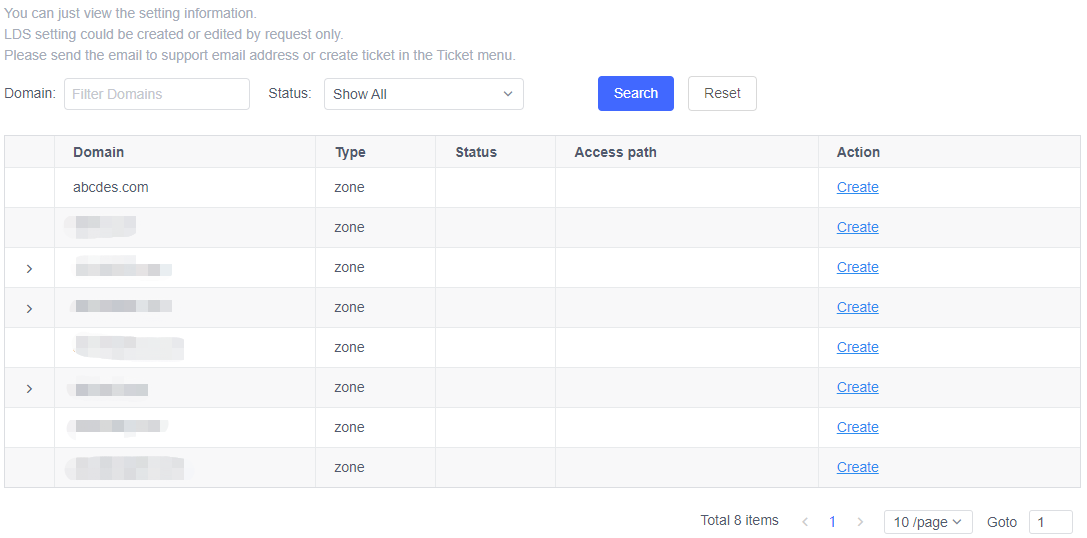
In this screen, you can edit, delete or view the LDS settings.
1 . Search
You can search the domains which have set LDS.Enter the domain which you want to check or to set and click “Search” button, the result will display in the table.
It will show all domains by default. Only the zone and CLB domain can be set LDS.
-
Domain
The domain name or zone name.
-
Type
The domain is a zone or CLB domain.
-
Status
To indicate whether the domain has CLB settings.
-
Access Path
You can access the log using “Access Path”
2 . Create LDS settings
In “Action” column, if a domain does not have LDS settings, you can click “Create” button to set it.
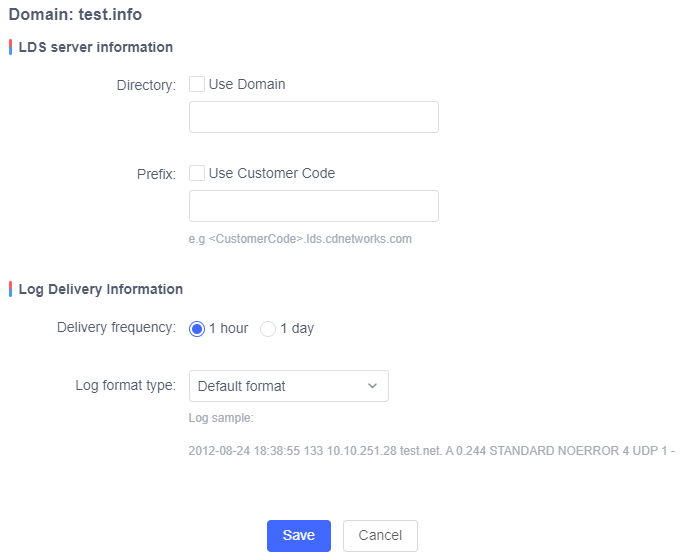
There are 2 sections: “LDS server Information” and Log “Delivery Information”.
“LDS server Information” includes 2 parameters: “Directory” and “User ID”.
Log Delivery Information" includes 3 parameters: “Publish Point”, “Delivery frequency” and “Log format type”.
-
Specify the “Directory”
You can enter a Directory manually and you can also check “Use Domain” to use domain as directory.
-
Specify User Customer Code
You can enter a User Customer Code, or you can also check “Use Customer Code” and use the account id as User Customer Code.
-
Delivery frequency
Select the log delivery frequency. The default is set to 1 hour. You can check 1 day to change the frequency.
-
Log Format Type
Choose the Log Format Type. The default value is “Default format”,and there is a Log sample for “Default format”. You can select “Cloud DNS +edns client-subnet”, and if you select it, there is a log sample for it.
-
Click “Save” button to save the LDS settings.
3 . Edit the LDS settings
In “Action” column, if a domain already has LDS settings, you can click “Edit” button to modify it.
The LDS server information including “Directory” and “User ID” cannot be modified.
4 . Delete the LDS Settings
In “Action” column, if a domain already has LDS settings, you can click “Delete” link to delete it.
5 . View the LDS Settings
In “Action” column, if a domain already has LDS settings, you can click “View” button to check it.