
Configuration Logic
最終更新日:2026-08-27 17:16:43
Overview
Cloud Security 2.0 manages security settings by domain. It provides three key configuration options: Managed Rules, Custom Configurations, and Shared Configuration. Together, they help you enable protection quickly, meet business-specific needs, and simplify management across multiple domains.
Domain-Based Configuration
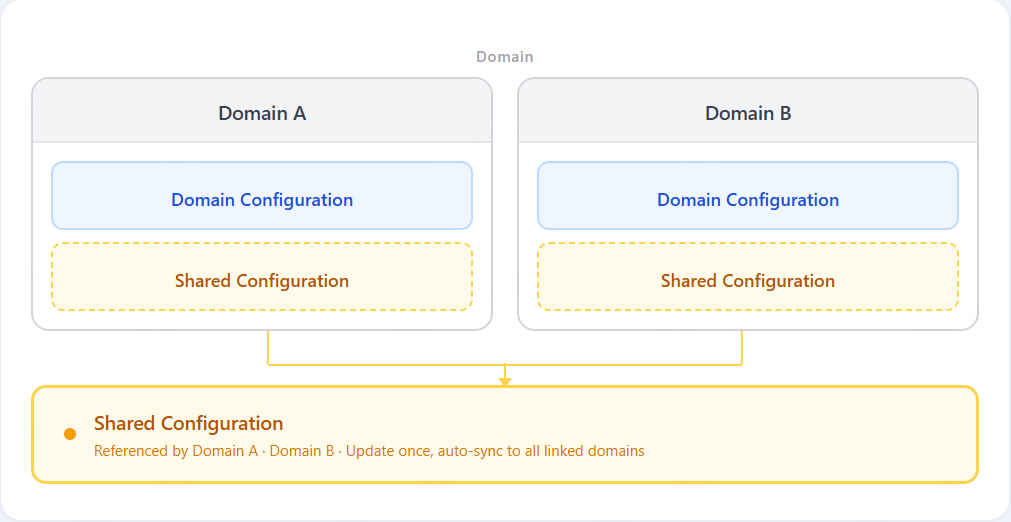
Each domain has its own independent security configuration. You can adjust policies for each domain separately, and changes to one domain do not affect others.
If multiple domains need the same configuration, you can create a shared configuration and associate it with those domains. Any update to the shared configuration is automatically applied to all associated domains.
To balance ease of use with configuration flexibility, Cloud Security 2.0 divides security settings into two types:
- Managed Rules: Predefined and continuously updated by the platform. Best for quickly enabling baseline protection.
- Custom Configurations: Defined by you based on your business needs for fine-grained protection requirements.
Managed Rules
Managed Rules are maintained by the CDNetworks Security Team and regularly updated to address new threats and reduce false positives. Once enabled, they provide built-in baseline protection without requiring complex manual configuration.
Managed Rules include:
Each managed rule has a default action based on its risk level. You can also change the action as needed.
Note: If you are using Cloud Security 2.0 for the first time, it is recommended that you enable Managed Rules first to quickly establish baseline protection.
Custom Configurations
If Managed Rules do not fully meet your needs, use Custom Configurations for more granular control. Cloud Security 2.0 supports:
- IP/Region Blocking
- Whitelists
- Custom Rules
- Rate Limiting
Common use cases with these capabilities include:
- Use IP/Geo Firewall to block traffic from specific IPs or regions
- Use Rate Limiting to define request thresholds for login, registration, or payment endpoints to prevent abuse
- Use Whitelists to permit trusted traffic and reduce false positives
- Use Custom Rules to apply different protection policies based on specific paths, parameters, or request characteristics
Shared Configuration
If multiple domains use the same custom policies, configuring them one by one increases maintenance effort. Shared Configuration lets you manage common custom rules in one place and apply them to multiple domains. Any update to a shared configuration is automatically synchronized to all associated domains.
Shared Configuration is a configuration reuse mechanism for custom configurations across multiple domains.It is useful when you manage many domains with similar security policies.
Recommended Configuration Approach
In most cases, we recommend the following configuration order:
- Enable Managed Rules to establish baseline protection.
- Add Custom Configurations based on your business needs.
- Use Shared Configuration if multiple domains require the same custom policies.
By following this approach, you can achieve faster onboarding while balancing protection effectiveness, business flexibility, and ongoing maintenance efficiency.