
About Bot Management
最終更新日:2026-09-10 11:55:04
Reading time: About 6 minutes
As internet adoption becomes universal and automation accelerates, Bot traffic has grown into a significant share of overall network traffic. While automated tools and intelligent agents make everyday life more convenient, they also pose major challenges to network security. Recent research shows that Bot traffic now accounts for more than 50% of global internet traffic.
Types of Bot Traffic
Bot traffic is highly mixed in composition, and businesses may view some types as beneficial and others as unwanted. Based purely on intent, Bot traffic falls into two categories:
- Good Bots: Primarily used to make people’s lives and work easier, such as search engines and website monitoring tools.
- Bad Bots: Primarily used to undermine network security and stability, for example through L7 DDoS attacks, credential stuffing, malicious scanning, and automated ticket scalping. Bad Bot attacks are most prevalent in industries such as finance, e-commerce, and social media.
Note: We do not classify Bots as good or bad on your behalf. You need to select the appropriate Bot management policies based on your website’s business content, allowing beneficial Bot traffic through while mitigating malicious Bot traffic.
Our Approach to Bot Management
We are committed to building a simple, intelligent automated threat protection system that balances strong security with an excellent user experience.
Built on the WAAP architecture, the product uses Bot intelligence, heuristic detection, machine learning, and active detection technologies to identify and manage different types of automated traffic on your network — helping keep your business secure, stable, and competitive.
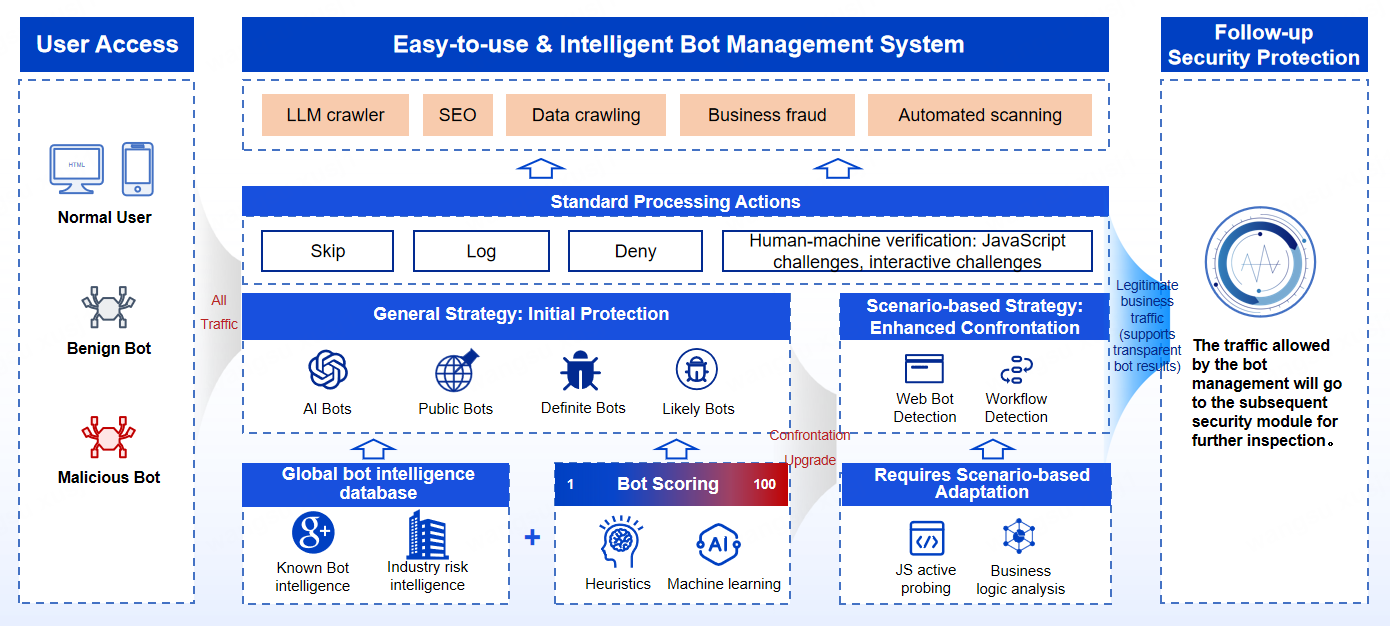
Overview of Bot Management Policies
The following are the main Bot management policies. For details, see the corresponding sections.
| Policy Name | Description | Use When |
|---|---|---|
| Custom Bots | Lets you define specific Bot characteristics — such as User-Agent, request headers, and fingerprints — to precisely manage particular types of traffic. | Use when your website receives traffic from explicitly authorized automation tools run by your own organization or by third-party vendors, and you need to allow this traffic so it isn’t mistakenly blocked by subsequent Bot policies. |
| AI Bots(Migrated to the AI Crawler Control) | Manage the traffic of automated programs such as AI Search, AI Training, and AI Agents related to large AI models. | Use when you want to block AI large-model crawlers with a single click, to prevent issues such as copyrighted content theft and sensitive data leaks. Or for businesses that want their content indexed and cited by LLMs (such as Perplexity and ChatGPT) to increase brand visibility in AI-generated answers. |
| Public Bots | Manages traffic from bots that are publicly declared on the internet, such as those used for SEO, marketing analysis, and website monitoring. | Use when you want to allow public crawlers that benefit your business with a single click. |
| Definite Bots | Manages non-public automated traffic with clearly identifiable characteristics, including automation frameworks, development frameworks, HTTP libraries, vulnerability scanners, crawler tools, proxy tools, and fake spiders. | Use when you want to block, with a single click, malicious automated activity carried out using crawler development tools, frameworks, and scanners commonly used by black-and-grey market operators. |
| Likely Bots | Manages traffic with abnormal behavior patterns that deviate from normal user characteristics, using multi-dimensional detection to identify potential hidden automation tools and reduce malicious attacks such as business fraud and data scraping. | Use when you want to apply secondary verification to suspicious requests that are highly likely to come from automated tools, so you can determine whether to block the malicious automation. |
| Web Bot Detection | Strengthens Bot defense in specific client scenarios using active detection technology, such as embedding a JS SDK in HTML pages. | Use for Web/H5 pages accessed through standard desktop or mobile browsers, including pages loaded through the built-in browser inside apps or mini programs (enhanced defense). |
| Workflow Detection | Applies custom rules based on the behavior logic of normal users to identify Bot traffic that doesn’t follow expected logic. | Use when you want fine-grained control over Bot traffic based on your own business logic (enhanced defense). |
Policy Priority
Policies are matched in the following priority order, from top to bottom, and the request is handled according to the configured action:
- Custom Bots
- AI Bots(AI Crawler Control)
- Public Bots
- Definite Bots
- Likely Bots
- Web Bot Detection
- Workflow Detection
Action Descriptions
- Deny: If a request matches a policy set to Deny, the system immediately blocks the request and returns a 403 response. All subsequent security policies are skipped.
- Skip: If a request matches a policy set to Skip, the system skips only the remaining Bot policy checks; the request still continues through the other security policy checks.
- Log: If a request matches a policy set to Log, the system records the event and continues running all subsequent security policy checks.
- Secondary Challenge: If a request triggers a secondary challenge (such as a JavaScript Challenge or Interactive Challenge), the request is denied if the challenge fails; if the challenge succeeds, the request is allowed through and continues to subsequent policy checks.
Important Limitations
1. Policy execution constraints:
- Policies are executed from highest to lowest priority; see the Policy Priority section.
- If a request matches a policy, the system immediately executes the action defined by that policy (such as Deny, Skip, or Log).
- If that action blocks the request, no subsequent policies take effect.
2. Scope of Web Bot Detection:
- Not supported for pure API services: For pure API services without a web interface (and therefore unable to embed JavaScript detection code), the risk identification capability that depends on active page-based detection is unavailable.
- Browser version limitations: Outdated or low-version browsers may carry compatibility risks due to differences in browser engines and incomplete standards support, which can affect detection accuracy. We recommend using an up-to-date browser for reliable results.